Share This Article
No items found.

Meeting room booking software fails when it's treated as a standalone scheduling tool instead of a coordination layer for hybrid work, it breaks down when room data is disconnected from calendar systems, occupancy sensors, and real estate planning. The fix is integration and ownership: sync the tool with your existing calendar infrastructure, feed it real usage data, and assign someone to act on that data. Done right, it turns guesswork about where people work into a system that cuts wasted room capacity and shows you which space to give up or keep.
A calendar invite tells you a room was reserved. It does not tell you whether anyone walked in, which is why most conference room data across hybrid offices is effectively fiction until it's confirmed by check-in or occupancy sensors.
Hybrid schedules broke the assumption that a booked room equals a used room. When teams split their week between home and office, recurring meeting invites outlive the reasons they were created, standing holds get renewed out of habit, and departments reserve blocks of space "just in case" a few people decide to come in. None of this shows up as waste on a calendar, it shows up as a room marked busy at 10 a.m. with nobody inside it. Appspace points to research showing mid-sized rooms built for 6–9 people average only 2.6 attendees, and that daily utilization can swing more than 20% from one day to the next [4]. That volatility is exactly what makes manual coordination fail and what makes real estate sized for a five-day workweek increasingly mismatched to actual attendance.
It replaces assumed occupancy with confirmed occupancy, so facilities teams can see which rooms sit empty despite being "booked" and act on it. Modern systems pair meeting room booking software with no-show detection and auto-release rules that free a room after a few minutes of inactivity, which stops habitual holds from blocking space other teams actually need [1]. That data, tracked over weeks rather than days, is what turns "we think we have too much space" into a defensible decision to consolidate a floor or let a lease lapse.
It connects an individual's room reservation to the broader question of who else is in the building that day, so coordination stops being guesswork. Upflex's UnifyAI engine forecasts office attendance at 97% accuracy and feeds that forecast into desk and room booking, so a manager can see not just that a room is free but whether enough of the team will be on-site to justify using it. That shifts the conversation from "is this tool configured correctly" to whether the organization is willing to use what the data shows, including resizing its real estate footprint instead of just watching the dashboard.
Most deployments fail for five specific, fixable reasons: ghost bookings, apps nobody opens, bad occupancy data, weak mobile support, and calendar sync that quietly breaks. Each failure traces back to a missing capability, not a missing tool.
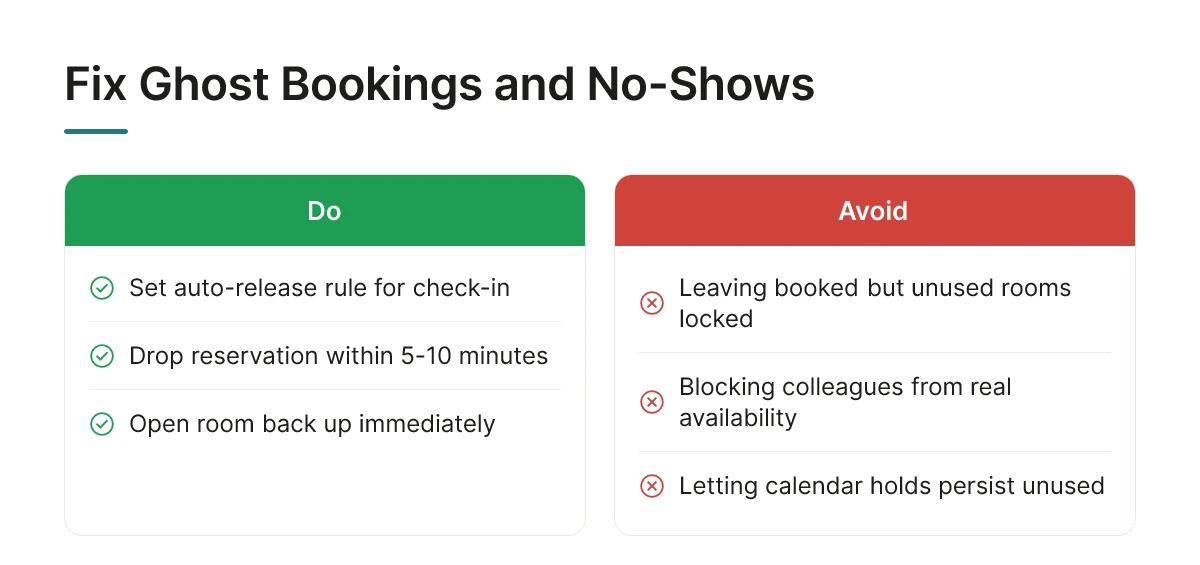
A room held on the calendar but never used is worse than no booking at all, it blocks colleagues from finding real availability. The fix is an auto-release rule: if nobody checks in within a set window, usually five to ten minutes, the system drops the reservation and opens the room back up. Appspace points to mid-sized rooms built for six to nine people hosting an average of 2.6 attendees, with daily utilization swinging by more than 20% [4]. Without automatic release, that gap never shows up until someone complains.
Employees won't open a dedicated portal just to reserve a room, they book from whatever tool is already open. Meeting room booking software only gets adopted when reservations happen inside Outlook, Google Calendar, or a chat tool like Slack or Teams, with the room treated as a calendar resource rather than a separate system [1]. A booking flow that requires a login nobody remembers gets abandoned within weeks.
Reservation counts alone lie, they count intent, not presence. Occupancy sensors or check-in confirmation give facilities teams actual usage numbers instead of calendar guesses, which matters directly for portfolio decisions. Upflex builds this logic into its UnifyAI engine, which forecasts attendance with 97% accuracy and feeds real occupancy data back into space-planning decisions rather than relying on who clicked "book."
The real test isn't whether a mobile app exists, it's whether booking still works when wifi drops or someone's walking into the building with no signal. Some platforms cache room availability locally and sync once connectivity returns; others fail silently and show stale data. For a global enterprise with employees moving between offices and travel days, that gap determines whether the room list on someone's phone matches reality at 9 a.m. or reflects yesterday's bookings.
Integration with Exchange or similar systems needs two-way sync, not a one-time import, otherwise the data drifts out of date within weeks as changes made in one system never reach the other. A one-way feed looks fine on day one and breaks silently by day thirty, leaving double bookings that nobody notices until a meeting collides.
Rollouts succeed when you treat room booking software as a change management project, not a software install, the technical setup is the easy part; getting employees to abandon email chains and sticky notes is where most deployments stall.
Sales demos make calendar sync and directory integration look instant. In practice, connecting meeting room booking software to Microsoft 365 or Google Workspace, your identity provider, and your access control or sensor network takes weeks, not days, longer if you're running a legacy on-premises directory or coordinating across multiple office locations with different IT configurations.
Complexity scales with the number of systems you're bridging, not with headcount. A 200-person single-office deployment that only needs calendar sync is simpler than a 2,000-person company connecting four systems: calendar, directory, badge access, and occupancy sensors. Each additional integration point is a place where data can fall out of sync or double-bookings can slip through [1].
Budget extra time if any office still relies on a legacy IWMS platform. These systems were often built before hybrid scheduling existed, and bridging them to modern booking tools frequently requires middleware or a phased cutover rather than a clean swap.
Run the new system in parallel with your existing manual process for a defined trial period, typically four to eight weeks, before retiring spreadsheets or shared calendars entirely. This parallel run lets facilities teams catch sync errors and gives employees a safety net while they build new habits.
Pick one pilot floor or building rather than switching the whole company at once. A contained pilot surfaces integration issues, a conference room that doesn't sync, a directory group that's missing permissions, while the blast radius is small enough to fix quietly, instead of generating complaints across every office on day one.
None of this works without a named internal owner. Without someone accountable for driving adoption, monitoring usage, and chasing down holdouts, teams revert to email threads and sticky notes within weeks, regardless of how capable the underlying system is [3]. Upflex's desk booking and space management workflows are built to sit inside this kind of phased rollout, so workplace teams can pilot in one location, validate attendance forecasts against real behavior, and expand without re-architecting the integration each time.
The return comes from two levers: shrinking the real estate footprint using accurate utilization data, and recovering the hours employees lose coordinating meetings manually.
Most finance leaders evaluating meeting room booking software ask the wrong first question. They ask what it costs instead of asking what it reveals. Once a system logs who actually used which room, and when, the data tells you where capacity sits unused, and unused capacity, once measured, is a sublease or exit decision waiting to happen. A floor running at low occupancy on a Tuesday is the opening evidence for a portfolio consolidation case, not just a scheduling nuisance.
Appspace's research illustrates the scale of the mismatch: mid-sized rooms built for 6–9 people host an average of 2.6 attendees, while daily utilization swings more than 20% [4]. That gap between designed capacity and real use is exactly what room booking data exposes, and exactly what gets cut from a lease renewal negotiation once it's documented.
Build the case with four inputs, not a vendor's pitch deck.
Weigh the first two against the second two. If unused capacity costs more per quarter than the software and integration combined, the case is straightforward.
Vendor comparisons rarely show the full cost. Room displays and tablets add hardware spend per door. IT time to integrate with existing calendar systems and badge readers adds weeks, not days. Change management, training employees to actually use the new booking flow instead of reverting to email threads, is the cost most often left out entirely, and the one most likely to stall the ROI timeline.
Upflex approaches this with attendance forecasting ahead of booking, so the utilization data driving the real estate decision exists before the room is even reserved, supporting documented outcomes of 40%+ reduction in real estate spend without disrupting in-office experience.
The right setup depends on building count, access control complexity, and how tightly room booking needs to connect to desk and space data, not on which tool has the longest feature list.
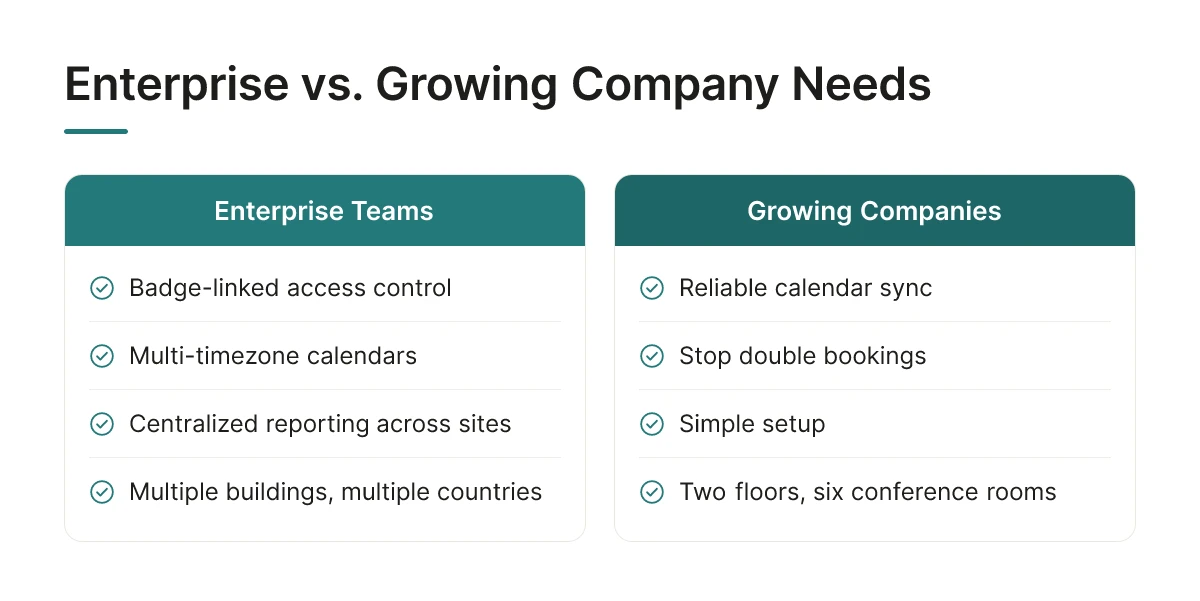
A global enterprise managing a dozen buildings across multiple countries needs meeting room booking software that handles badge-linked access control, multi-timezone calendars, and centralized reporting across every site. A growing company with two floors and six conference rooms usually just needs reliable calendar sync and a way to stop double bookings.
Enterprises also carry more organizational weight behind each decision. Corporate real estate leaders evaluating a rollout across 20 locations are answering to a CFO who wants portfolio-level utilization data, not room-by-room anecdotes. A smaller company can get away with a lighter system because the cost of a wrong booking is a scheduling annoyance, not a six-figure lease decision.
Hardware-dependent setups, room displays outside doors, occupancy sensors, door panels, give you accurate, automatic data on who actually used a room and for how long. That accuracy is why occupancy analytics and no-show detection have become standard features in modern systems [1]. The tradeoff is upfront cost and install time: mounting displays and wiring sensors across dozens of rooms takes budget and weeks, not days.
Hardware-free approaches, QR codes on the door, app-only booking, calendar-based reservation, roll out fast and cost little beyond the software subscription. The tradeoff runs the other way: without a sensor to confirm someone showed up, you're relying on employees to book correctly and release rooms they don't use, which is a known source of the "ghost meeting" problem facilities teams report in hybrid offices where mid-sized rooms sit at a fraction of their capacity [4].
The decision frame is straightforward. Choose hardware-dependent when utilization accuracy drives a real estate decision, a lease renewal, a consolidation case, a CFO review. Choose hardware-free when speed of rollout and lower upfront cost matter more, such as a new office opening or a company still testing its hybrid model.
Hybrid-first organizations with no fixed desks face a different requirement entirely: room booking has to connect to desk and space booking in real time, because a team deciding to come in on Tuesday needs to see room and desk availability together, not in two disconnected systems. Upflex addresses this by combining desk booking and space management with UnifyAI attendance forecasting, so room availability reflects who's actually predicted to be in the building rather than a static calendar.
Yes, room booking software runs fully through web and mobile apps without requiring door-mounted displays or sensors. Many organizations start with calendar-based booking alone and add room displays or occupancy sensors later, once they know which locations justify the extra investment.
Most organizations see measurable utilization data within the first 60-90 days of rollout. Real estate decisions, like consolidating underused floors or renegotiating a lease, typically follow a full quarter or two of occupancy data, once patterns across teams and locations become clear.
Not on its own, though many platforms now combine both functions in one dashboard. Rooms and desks have different usage patterns, rooms are scheduled for scheduled meetings, desks are claimed day-to-day, so the two experiences need to be designed for how they're actually used, not retrofitted from the same booking logic.
Most platforms sync directly with Outlook or Google Workspace, so existing recurring meetings and room holds carry over without re-entry. It's worth auditing standing meetings before go-live, since legacy recurring bookings sometimes hold rooms no longer needed under a hybrid schedule.
Meeting room booking software only solves half the coordination problem if it stops at the room door. The real gain comes from connecting room data to attendance forecasting, so you know not just which rooms are booked, but which days teams will actually show up to use them. Upflex pairs that forecasting, 97% accuracy through UnifyAI, with booking workflows and access to an on-demand workspace network, giving real estate leaders the utilization data needed to justify consolidation. Start by auditing 30 days of current room-booking data against actual badge-in attendance; the gap between the two numbers will tell you exactly where to focus first.
Explore more from our content library: