Share This Article
No items found.

Understanding anchor days hybrid work is essential. Anchor days are the fixed, company- or team-designated days each week when hybrid employees are expected to work from the office, used as the scheduling backbone for workplace planning rather than leaving in-office time fully flexible. Unlike generic hybrid policies that just set a weekly day count, anchor days name specific calendar days (for example, every Tuesday and Thursday) so teams, desks, meeting rooms, and real estate capacity can be planned around predictable attendance. Done well, they let a company right-size its office footprint, concentrate collaboration time, and give employees a consistent rhythm instead of guessing who will be in on a given day.
Anchor days are named calendar days, not just a weekly quota, that a company, department, or team designates as mandatory in-office time, giving every other hybrid model a fixed point of reference. "Three days in the office" is a target. "Every Tuesday and Wednesday" is an anchor day. That distinction is what separates a schedule that can be planned around from one that can only be hoped for.
The difference matters because a day count alone tells a real estate team nothing about which days to staff, cool, or provision desks for. Anchor days hybrid work solves that by naming the day, not just the frequency, which is why it has become the preferred model for organizations trying to pair hybrid flexibility with serious space planning. For a broader look at how this fits into the wider hybrid landscape, see this complete guide to hybrid work.
Most hybrid arrangements settle at two to three in-office days per week, a range wide enough to preserve flexibility but structured enough to still count as genuinely hybrid rather than de facto remote or de facto full-time office work [2]. Go below two days and the office risks becoming optional in practice, with attendance too thin and unpredictable to plan around. Push past three or four and the arrangement starts to resemble a traditional five-day model with a remote day bolted on, eroding the autonomy that made hybrid attractive to employees in the first place.
A schedule only stays "truly hybrid" when both halves of the arrangement are real: meaningful remote time and a dependable, well-used office presence. Anchor days are one way to secure the office side of that balance without reverting to a blanket mandate.
Staggered schedules rotate which groups come in on which days specifically to spread out occupancy and avoid overcrowding, trading the collaboration benefit of shared presence for better space utilization [1]. Team-based flexibility hands the day-selection decision to each team, which preserves autonomy but makes cross-team coordination and portfolio-wide space forecasting far harder. Outcome-based policies drop fixed days altogether, judging hybrid arrangements on results rather than attendance, which maximizes individual flexibility but offers real estate planners almost no signal to work with.
Every one of these models makes the same fundamental tradeoff: predictability for space planning versus autonomy for employees. Anchor days deliberately favor predictability, which is precisely why anchor days hybrid work pairs well with attendance forecasting and desk booking systems that need a stable pattern to optimize against.
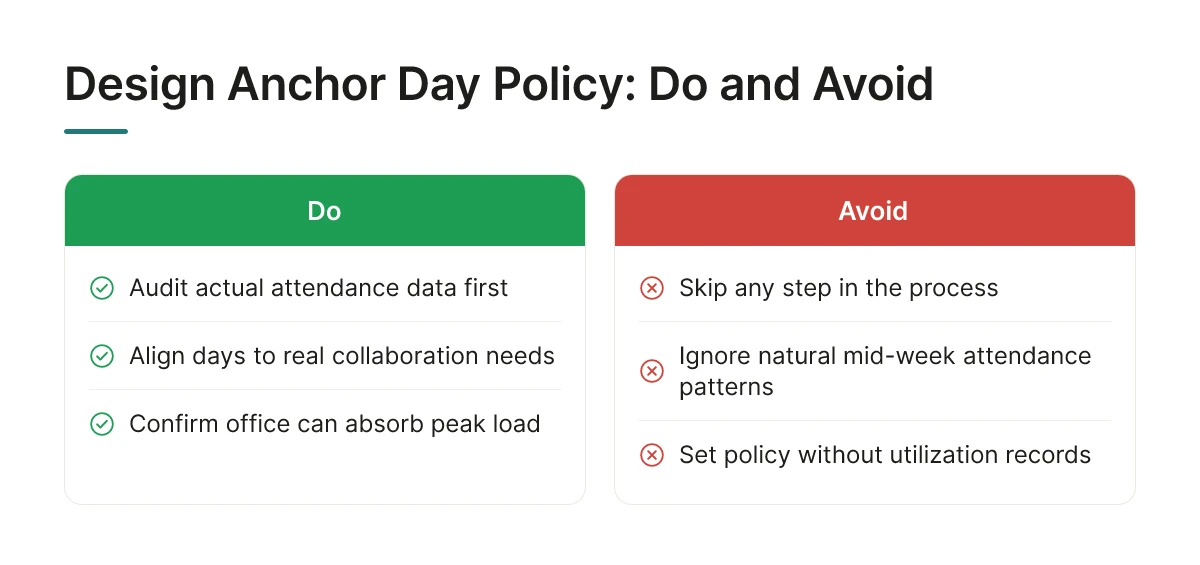
A working anchor day policy follows three steps in order: audit actual attendance data, align days to real collaboration needs, then confirm the office can physically absorb the resulting peak load. Skip any one of these and the policy usually breaks within a quarter.
Start with the audit. Pull badge data, desk booking logs, or whatever utilization records you already have to see which days people come in without being told to. Most hybrid offices already show a natural lean toward the middle of the week, so your policy needs to work with that pattern, not ignore it. Next, map which teams actually need to be in the same room, product and design syncing on a launch, sales and customer success handling a renewal cycle, and set anchor days around those dependencies rather than picking days that look good on a company calendar. Only after that should you lock the days in, once you've checked that meeting rooms, desks, and parking can handle everyone showing up at once.
The biggest failure mode is what's become known as the anchor day paradox: when every team defaults to the same convenient days, usually Tuesday through Thursday, the office ends up more crowded and less functional than it was with no policy at all [1][5]. Employees commute in expecting collaboration and instead spend the day hunting for a desk or sitting in overflow seating on a video call anyway, which is worse than the unpredictability anchor days were meant to solve [1].
Three mistakes drive this. First, leaders set days without checking whether meeting rooms and desk inventory can support the peak. Second, they ignore commute patterns and transit availability, which quietly determines who shows up and who doesn't. Third, and most common, they treat attendance itself as the goal, tracking who swiped in, instead of measuring whether the day actually produced better collaboration [5]. A full room with no shared agenda isn't a win.
Enforcement that relies on badge-swipe tracking tends to breed resentment rather than compliance [1]. A better approach puts accountability with managers, who know whether their team's in-office days are producing real collaboration, paired with attendance visibility that's transparent rather than punitive, people can see who's coming in without feeling surveilled.
Designing anchor days hybrid work policies around trust rather than monitoring is also what makes rollout sustainable. Pilot the policy with a single department first, watch how utilization data responds, then adjust before expanding company-wide. Forecasting tools that predict attendance before it happens, rather than just reporting it after the fact, give you the lead time to fix capacity problems before they become a reason employees stop showing up. Upflex's UnifyAI engine, for instance, forecasts attendance at 97% accuracy, which lets real estate and workplace teams catch a Tuesday capacity crunch before it happens rather than reacting to a packed, frustrating office after the fact.
Anchor days convert unpredictable attendance into a known pattern, and that predictability is what lets corporate real estate teams cut square footage with confidence instead of guesswork.
The mechanism is straightforward. Once a company knows that Tuesday and Thursday are consistently peak days and Monday and Friday are consistently light, it can consolidate underused floors, renegotiate a lease around a smaller footprint, or shift from a fixed campus to a mix of core space plus on-demand access for overflow. Without that pattern, real estate leaders are stuck sizing the office for a worst-case guess, which is how companies end up paying for space that sits empty four days out of five. Upflex's UnifyAI engine exists for this exact problem, it forecasts attendance with 97% accuracy so real estate and workplace leaders can see which days will peak before committing to a lease decision, and organizations using this kind of forecasting have documented 40%+ reductions in real estate spend by right-sizing around actual, not assumed, demand.
Three metrics tell you whether an anchor day policy is paying off: utilization rate on anchor versus non-anchor days, cost per occupied desk, and meeting-room usage patterns.
Co-attendance tracking adds a layer most utilization reports miss: whether the people who need to be in the room together are actually showing up on the same day, not just whether the building is full.
Predictable anchor days reduce commute-planning stress and protect uninterrupted focus time on remote days, but rigid enforcement can erode the autonomy that makes hybrid work attractive in the first place.
When employees know their in-office days months in advance, they can plan childcare, commutes, and heads-down work around a fixed rhythm instead of scrambling to react to last-minute office mandates. That stability supports retention and lowers burnout risk. The tension shows up when leaders chase maximum office utilization at the expense of deep-work time, stacking too many anchor days, or picking days that interrupt focused project work, pushes employees toward resentment rather than engagement. Getting anchor days hybrid work right means choosing the fewest days that still hit collaboration goals, not the most days that fill the building.
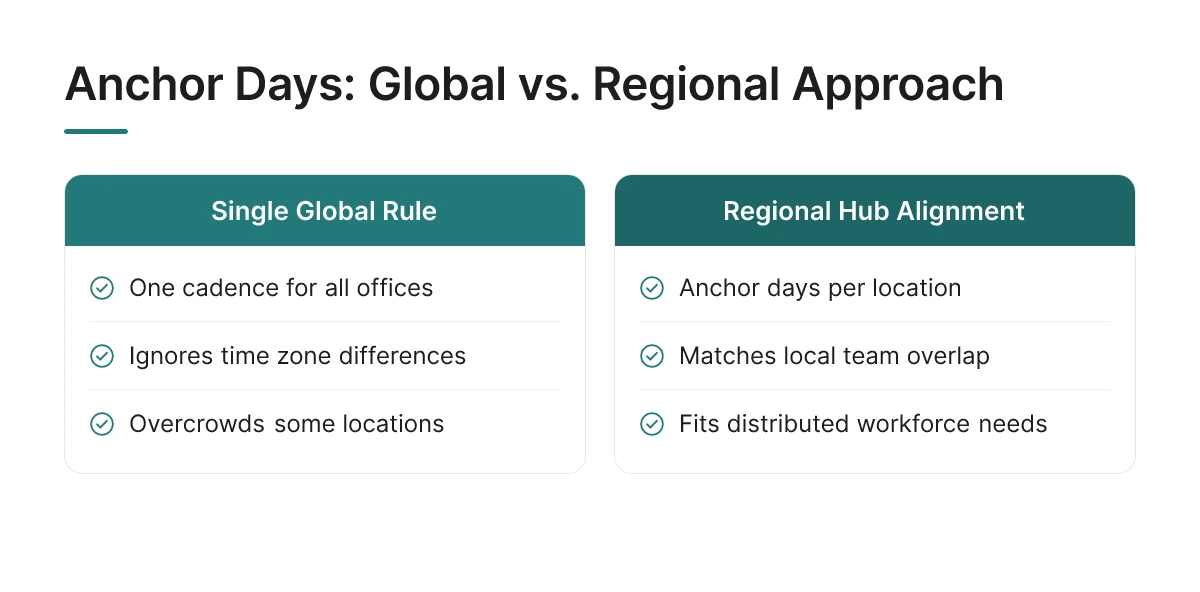
A single company-wide anchor day rarely survives contact with a distributed workforce, the fix is setting anchor days per regional hub, aligned to each location's own team overlap rather than a global calendar.
Anchor days hybrid work design starts to strain the moment a company operates across time zones or office sizes that don't match. A rule that works for a 400-person New York hub, "everyone in Tuesday and Thursday", makes no sense for a six-person satellite office in Singapore with no local leadership overlap. Forcing one global cadence onto every office either overcrows some locations or leaves others with an anchor day nobody shows up for, because the people they need to see work three time zones away.
The practical solution is regionalizing the policy: each hub sets its own anchor days based on which teams actually share that office, while a lightweight corporate framework keeps the principle consistent. London might anchor on Tuesday and Wednesday; Austin might choose Wednesday and Thursday. What stays uniform is the logic, anchor days exist to guarantee overlap, not to hit an identical weekday across the portfolio [5]. This kind of regional rightsizing also has direct real estate implications, as discussed in this guide to rightsizing office space in a hybrid work environment.
A workable anchor day policy needs four defined elements, regardless of company size or location count.
Upflex's UnifyAI engine supports this framework directly by forecasting attendance with 97% accuracy, which gives the policy owner the utilization data needed to confirm an anchor day is actually achieving its co-attendance target before the next review cycle, rather than guessing from badge swipes.
Remote-first organizations don't need weekly anchor days to get the collaboration benefit, an anchor week or quarterly on-site achieves the same goal at a cadence that matches a distributed, low-office-footprint model [3]. The distinction matters: a weekly anchor day assumes a nearby office and a commuting workforce, while an anchor week assumes people fly in, making it a deliberate event rather than a routine.
For organizations running several city offices, the coordination challenge shifts to aligning anchor days across locations so traveling employees and cross-office teams land on predictable overlap days. Upflex's on-demand workspace network supports this by giving employees access to workspaces in cities beyond their home office, so a cross-office anchor day still has a desk waiting regardless of which hub someone works from that week.
Workplace optimization software turns an anchor day policy from a document nobody reads into a system people actually follow, by forecasting attendance, tying booking to the designated days, and reporting whether the policy is working. Without that layer, anchor days default to the honor system, and honor systems are exactly what cause the overcrowded Tuesdays and empty Thursdays anchor days are meant to prevent.
These platforms connect three functions that most companies run separately today: who's expected in, what space is available, and what actually happened. Attendance forecasting predicts headcount for each anchor day before the week starts, desk and room booking restricts or prioritizes reservations around those days, and utilization dashboards compare predicted turnout against badge or sensor data afterward. That loop is what separates anchor days hybrid work programs that improve over time from ones that calcify around a bad initial guess. A platform that only handles booking, with no forecasting or feedback, leaves leaders flying blind on whether Tuesday's anchor day is actually delivering the co-attendance it was designed for.
Three capabilities matter more than the rest when evaluating a platform for anchor day management.
Upflex addresses this through its UnifyAI engine, which forecasts office attendance with 97% accuracy, giving real estate and workplace leaders a way to validate anchor-day predictions against what actually happens, rather than guessing. That forecasting feeds directly into desk booking and space management, so an anchor day policy translates into reserved capacity instead of a calendar note. The platform's office orchestration approach also tracks co-attendance against target, which is the metric that tells you whether an anchor day is delivering collaboration or just filling a badge log. For companies managing both owned offices and remote team members, Upflex's on-demand workspace network extends that same orchestration to employees who need a professional space near them on non-anchor days.
When comparing platforms, weigh cost tier against portfolio complexity rather than chasing the cheapest option. A company with a single headquarters has different needs than a global enterprise managing a dozen sites, and budget-friendly tools built for the former often lack the forecasting depth and cross-office reporting a larger portfolio requires, while enterprise-tier platforms justify their cost through the real estate decisions they help validate.

Most hybrid teams settle on two to three anchor days per week, pairing fixed in-office days with flexible remote days [5]. Two days tends to suit teams prioritizing flexibility, while three supports heavier collaboration needs. The right number depends on team function, office capacity, and how many days deliver real co-attendance rather than just empty desks.
Yes, team-level anchor days usually work better than a single company-wide schedule [2]. Sales might anchor on Mondays and Wednesdays, while product anchors on Tuesdays and Thursdays. This staggers office demand, avoids Tuesday overcrowding, and keeps attendance tied to the people each team actually needs in the room.
A missed anchor day should trigger a simple swap or manager notification, not a penalty. Occasional exceptions for travel, illness, or personal conflicts are normal and shouldn't be treated as policy violations [1]. What matters is that exceptions stay occasional. If an anchor day routinely sees low turnout, that's a signal to revisit the schedule, not just enforce attendance harder.
Anchor days generally don't apply to remote-first companies with no shared office [5]. The concept depends on a physical location where a team can gather consistently. Fully distributed teams get similar coordination benefits by scheduling recurring virtual overlap hours or periodic in-person offsites instead.
A quarterly review is a reasonable starting cadence for most organizations. This gives enough time for attendance patterns to stabilize while still catching problems, like a consistently underused anchor day, before they calcify into habit. Faster-growing teams or those adding new office locations may need to review their anchor days hybrid work policy more frequently, since team composition and space needs shift faster than a standard quarterly cycle can account for.
Anchor days only deliver value when they're designed around actual team needs, not imposed as a blanket mandate. Stagger schedules by team, track real co-attendance instead of raw badge swipes, and revisit the policy when a day consistently underperforms. The real estate payoff depends on pairing anchor-day coordination with accurate attendance forecasting, guessing which days to staff for is what keeps offices either overcrowded or half-empty.
Upflex's UnifyAI engine forecasts attendance with 97% accuracy, helping real estate and workplace leaders set anchor days backed by data rather than instinct. Start by auditing your current attendance patterns before locking in next quarter's anchor-day schedule.
Explore more from our content library: