Share This Article
No items found.

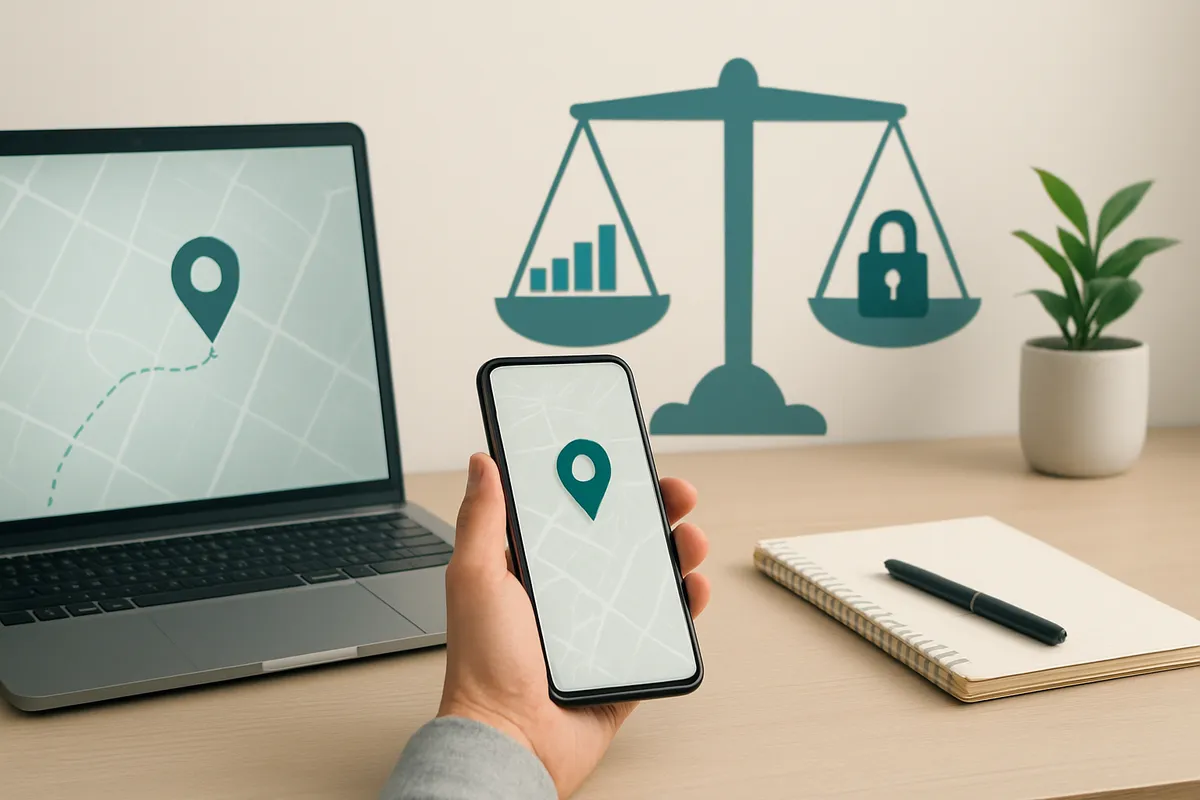
Employee location tracking software is legal in most jurisdictions when you have documented consent, a clear business purpose, and limits on when and what you collect, but legality alone does not make a deployment ethical or good for trust. The strongest hybrid-work programs track workspace and attendance patterns (desk usage, building check-ins, co-attendance) rather than continuous personal movement, disclose exactly what's collected and why, and give employees access to their own data. Treat it as a policy and trust decision first, a technology decision second.
Responsible implementation means tracking where people work, not where they go: scope the system to workplace presence, write the policy first, and pilot before you scale. For hybrid teams, that distinction is the whole job.
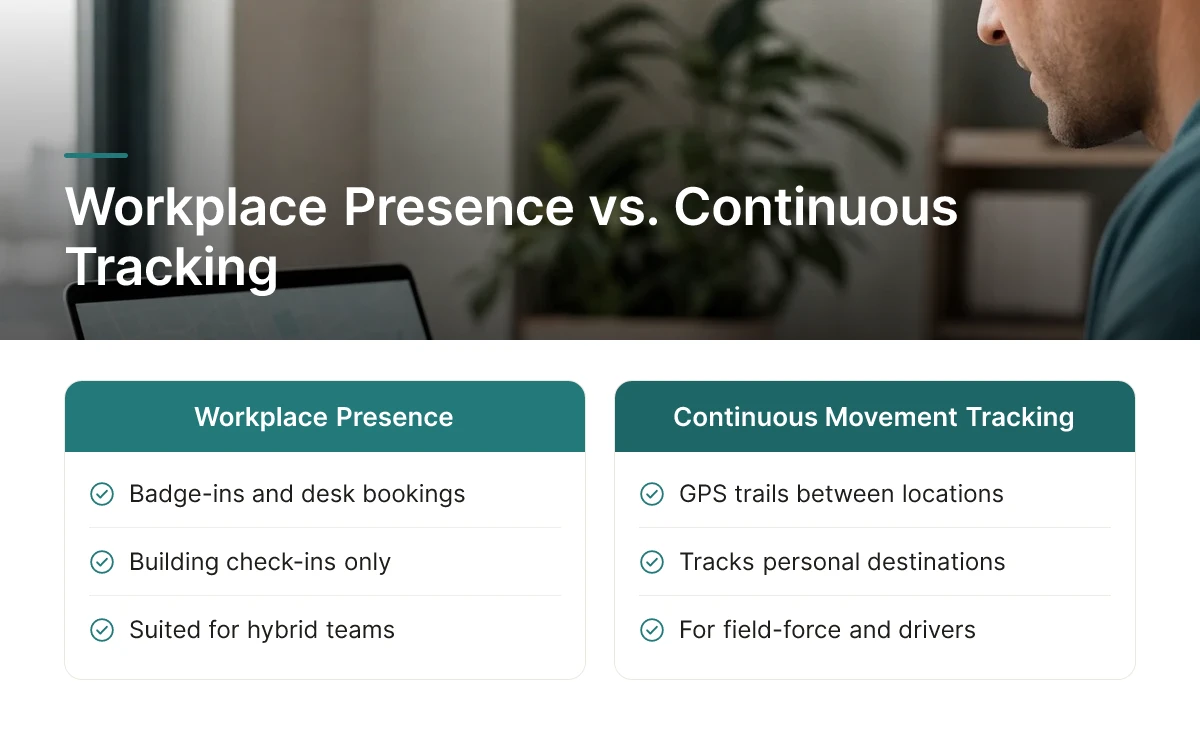
Hybrid teams need badge-ins, desk bookings, and building check-ins, not continuous GPS trails of where an employee goes between home, a coffee shop, and the office. Field-force GPS tracking exists to solve a different problem: verifying location for drivers, technicians, or delivery staff moving between job sites during paid hours [4]. Applying that same logic to a hybrid office employee invites legal exposure and erodes trust for no operational gain.
State GPS tracking laws already draw this line for vehicle and field use, requiring written policies and, in several states, employee consent before any location data is collected [3]. A corporate real estate or HR leader deploying employee location tracking software for office coordination should hold themselves to the same standard even where the law doesn't explicitly require it, because the business justification for tracking a desk check-in is entirely different from the justification for tracking a personal vehicle.
Four capabilities matter for hybrid coordination: occupancy and check-in data, co-attendance visibility, calendar and booking integration, and opt-in scope controls that limit collection to work hours and work locations.
Aggregated check-in and booking data shows which floors, neighborhoods, or desks are actually used, turning individual presence records into a portfolio decision tool. Upflex's UnifyAI engine, for example, forecasts attendance with 97% accuracy and feeds that forecast into desk booking and office orchestration, so real estate leaders can see utilization patterns before deciding which space to consolidate or redesign. That's a materially different use of location data than tracking an individual's movements, it's aggregate, purpose-bound, and tied to a real estate decision, not personnel evaluation.
Define the business purpose first, scope data collection to that purpose only, document the policy in writing, pilot with one team, then roll out. Skipping the written policy and switching on employee location tracking software "to see what the data shows" is the fastest way to turn a utilization project into a trust problem.
Legal exposure and employee trust both hinge on the same decision: default to the strictest applicable standard, written consent, defined retention, and a named purpose, rather than the minimum your weakest jurisdiction allows.
No single rulebook governs employee location tracking software across a global workforce. Some states require written consent before GPS tracking of personal vehicles, while others permit tracking of company vehicles during business hours with notice alone [3]. Washington allows vehicle tracking with fewer restrictions, while Florida, Texas, Pennsylvania, and Illinois require consent specifically when the vehicle belongs to the employee rather than the company [3]. U.S. employers also face a patchwork of state rules on whether informed consent and a written monitoring policy are mandatory at all, separate from the GPS-specific statutes [2].
For multinational enterprises, this means building one policy to the highest bar in the portfolio rather than maintaining jurisdiction-by-jurisdiction exceptions. A consent framework that holds up everywhere typically includes:
Employers should also establish a legitimate business reason before deploying any tracking tool and communicate that reason transparently rather than retrofitting a justification later [3].
The ethical line sits between monitoring work output or office presence and monitoring where a person goes once they clock out. Tracking that stops at business hours and work-related movement, confirming a desk is occupied or a delivery route is on schedule, is a different proposition from logging an employee's location nights and weekends [4]. Several state laws already reflect this distinction by restricting after-hours tracking on personal devices or personal vehicles even when company-owned tools are in use [2]. Transparency is what separates a program that's merely legal from one employees actually trust. Telling people what's collected, why it's collected, and exactly who has access to it, is a cost and productivity story, not a surveillance one [3]. Programs introduced without that context tend to generate suspicion regardless of their actual scope, while ones that lead with the business case for data collection face far less pushback. Over-collecting is a risk even when every data point is technically legal. Capturing more location detail than a stated purpose requires raises retention costs, expands breach exposure, and signals to employees that oversight has no boundary. Workplace platforms built for office utilization and attendance forecasting, Upflex is one example, built to work from desk-booking and scheduling data rather than continuous personal GPS tracking, show that organizations can get the utilization insight they need without collecting more than the purpose demands.
Location data works best as one input feeding a central planning system, not as a standalone feed watched by individual managers. In a well-built hybrid work setup, presence signals from badges, check-ins, and desk bookings flow into the same dashboard used for space planning and scheduling, turning raw attendance data into decisions about square footage, not surveillance of individuals. For more information, see Ai Search Visibility Complete Guide To Tracking.
Aggregated presence data shows which floors, buildings, or regions sit underused long before a lease renewal forces the conversation. A corporate real estate team pulling six months of check-in patterns across three buildings can see, for example, that one floor consistently runs below 30% occupancy, a clear candidate for consolidation rather than renewal. This is the mechanism behind portfolio right-sizing: instead of guessing based on headcount, planners act on observed behavior over time.
Upflex applies this logic directly. Its UnifyAI engine forecasts attendance with 97% accuracy, and that forecasting data feeds real estate portfolio decisions, the same utilization insight that has helped organizations cut real estate spend by more than 40%. The data point isn't "where is employee X right now," it's "how much of this floor do we actually need."
Presence and booking data let planners match desk and room supply to actual team co-attendance days instead of guessing which days will be busy. If a sales team tends to cluster on Tuesdays and Wednesdays, that pattern, visible through historical check-ins and bookings, should drive how many desks and meeting rooms get reserved for that team, not a fixed, calendar-wide policy. Upflex's desk booking and coordination tools use this kind of attendance signal to help teams hit co-attendance targets, with documented outcomes around 88% co-attendance achievement.
This orchestration use case is distinct from GPS tracking in field service or logistics, where the goal is monitoring a vehicle's or technician's real-time route for dispatch and safety [4]. Hybrid office tracking concerns itself with building-level and floor-level presence trends, not turn-by-turn movement. Employee location tracking software built for office orchestration pulls from check-in and booking systems, not continuous GPS pings, which keeps the data scope appropriate to the business question being asked.
Tool costs across this category vary by scope, budget-friendly options cover basic desk booking, while mid-range and enterprise platforms add forecasting, portfolio analytics, and workspace network access. Evaluating fit should start with which decisions the data needs to support, not the price tag alone.
Rollouts fail less because of what employee location tracking software collects and more because of how little employees are told before it starts collecting it.
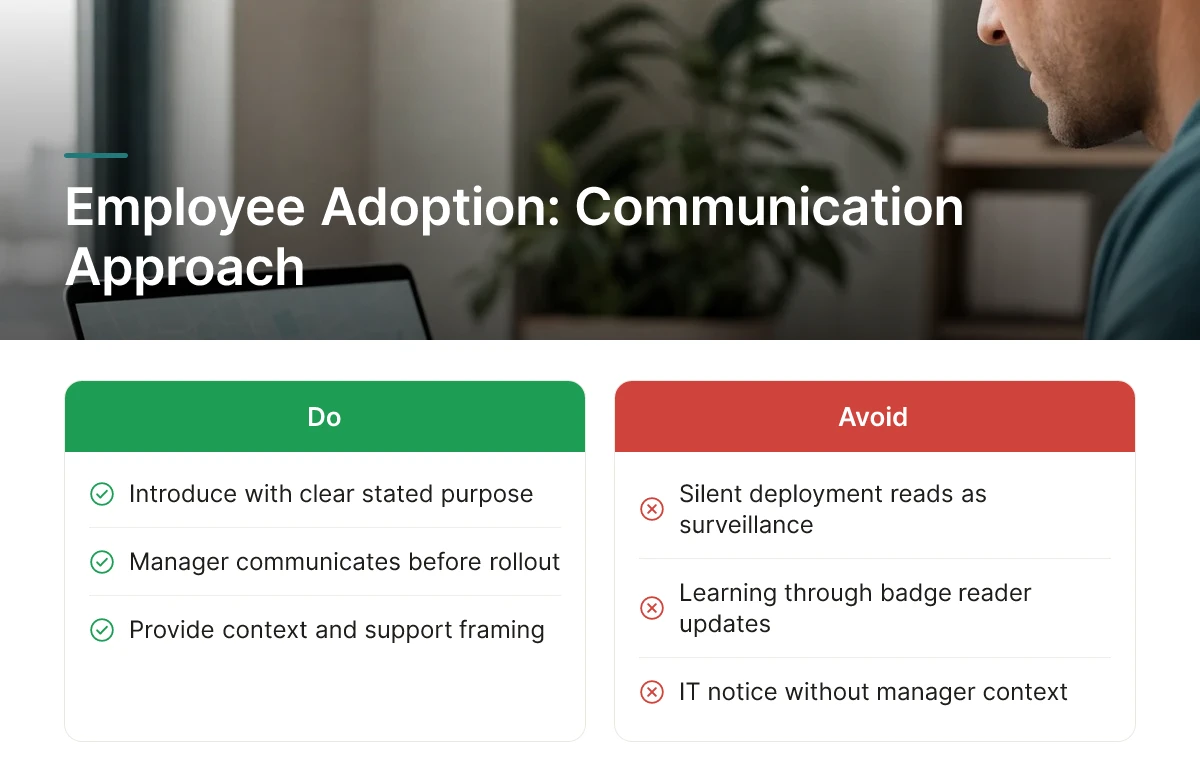
A silent deployment reads as surveillance. The same tool, introduced with context and a clear stated purpose, reads as support. That distinction, perceived surveillance versus perceived support, is the single biggest predictor of whether a team accepts the system or quietly works around it. Employees who learn about tracking through a badge reader update or an IT notice, rather than from their manager, assume the worst about intent. Trust, once damaged that way, is hard to rebuild even after the policy is clarified [1].
Sequence matters more than content. Explain the business purpose, right-sizing office space, coordinating hybrid schedules, confirming safety compliance, before any system goes live, not after someone notices it running. Several legal and policy sources agree that advance notice and a written policy are baseline expectations, not optional courtesies, and that informed consent substantially reduces both legal exposure and employee pushback [2] [3].
Next, let employees see their own data first. Access to a personal dashboard before managers get aggregate views signals the tool is informational, not punitive. Finally, name a specific channel for questions and pushback, HR, a works council where one exists, or a designated workplace experience lead, so concerns have somewhere concrete to go instead of circulating informally.
Scope creep is the most common cause of adoption failure: a system announced for desk availability quietly expands into granular movement logs or time-at-desk scoring nobody agreed to. Prevent it with a recurring policy audit that checks what's actually being collected against what was originally communicated, on a fixed schedule rather than ad hoc.
Practical change management follows a familiar pattern: run a pilot with one team, build a feedback loop before expanding, phase the rollout rather than flipping it on company-wide, and train managers explicitly on what the data should and shouldn't inform, scheduling and space planning, not performance reviews. Tracking presence data should never penalize employees for working flexible hours, or it undermines the hybrid policy it was meant to support.
Measure ROI by comparing each data point collected against a specific, pre-stated business return, if a metric doesn't map to a decision you'll actually make, cut it from scope.
Build a checklist before you sign a contract, not after. Four categories belong on it: real estate savings potential (what square footage could you actually give up), administrative time saved (how many hours does facilities or HR currently spend reconciling badge logs and spreadsheets), privacy and compliance risk exposure (what state or local consent laws apply, and what's your liability if policy and practice diverge), and expected adoption friction (will employees view this as a safety tool or a surveillance tool).
Skip industry-wide benchmarks for this exercise. Pull your own utilization data, current badge-swipe rates, current lease costs per square foot, current desk-to-employee ratios, and model savings off that baseline. A legacy system that's too rigid for hybrid work, like many incumbent IWMS platforms, often can't produce this baseline cleanly, which is itself a cost worth counting. Legal counsel should weigh in on the compliance side before procurement moves forward, since consent and notification requirements vary significantly by state [3][4].
Value looks different depending on where your workforce sits. Office-based hybrid teams get their return from space consolidation, knowing which days and which floors are actually occupied lets a corporate real estate leader renegotiate or exit leases with data behind the decision. Field-based and mobile roles get their return from scheduling efficiency and safety use cases instead, since the GPS tracking conversation there centers on vehicle routing, time verification, and duty-of-care obligations rather than desk utilization [5].
Don't borrow a case study from a different industry and assume it transfers. A warehouse operator's safety-driven justification for GPS tracking doesn't translate directly to a professional services firm deciding whether to track badge swipes for space planning, the legal basis, the employee reaction, and the metric you're optimizing for all differ.
Treat the data-point-to-return mapping as a living document. Every field collected by employee location tracking software should have an owner who can explain, in one sentence, what decision it informs. Review that mapping on a recurring cadence, quarterly for fast-moving hybrid policies, annually at minimum for stable programs, and remove any data stream that hasn't produced a measurable decision since the last review. Platforms built around office orchestration, like Upflex, are designed to report utilization and co-attendance outcomes specifically so this review has real numbers to work from rather than guesswork.
Consent requirements depend on the state and the device being tracked, so there's no single national answer. Several states require written consent for tracking on employee-owned vehicles or personal devices, while company-owned equipment typically needs only a documented policy and notice [3]. Always check state-specific statutes before rolling out any tracking tool.
Generally, no, tracking should stop when the workday ends, especially on personal devices or vehicles. Monitoring activity on a company device outside work hours sits in a legal gray area and varies by jurisdiction [2]. The safer practice is limiting tracking to business hours and company-owned equipment only.
GPS tracking monitors precise geographic location, often continuously, while office presence tracking confirms whether someone badged in or booked a desk at a building. GPS tracking applies mainly to field employees and company vehicles, where legitimate business reasons and written policies are required [3]. Presence tracking, used for hybrid coordination, is less invasive and typically doesn't capture movement outside the workplace.
GPS signal can degrade significantly indoors, which is why most workplace platforms rely on badge swipes, Wi-Fi, or booking data instead of satellite positioning. Upflex avoids this problem entirely by forecasting attendance through UnifyAI rather than relying on real-time GPS signals, reaching 97% forecast accuracy without tracking individual movement.
Small hybrid teams rarely need GPS-style tracking, simple desk booking and attendance coordination usually solve the real problem. Location tracking tools make more sense for field service or delivery operations than for coordinating a hybrid office schedule.
Employee location tracking carries real legal exposure, consent rules, state statutes, and personal-device boundaries vary enough that a one-size-fits-all policy will fail somewhere [2][3]. For most hybrid organizations, the actual goal isn't tracking where people are; it's knowing who's coming in and coordinating around it. That's a forecasting and scheduling problem, not a surveillance problem. Upflex solves it with UnifyAI's 97%-accurate attendance predictions and desk booking, helping teams hit co-attendance goals without collecting location data on individuals. Before deploying any tracking tool, audit whether you need location data at all, or whether better forecasting solves the coordination problem without the legal risk.
Explore more from our content library: