Share This Article
No items found.


Understanding how to manage hybrid work is essential. Managing hybrid work across multiple time zones comes down to matching office space to actual attendance patterns and giving distributed teams technology that coordinates schedules automatically. Instead of paying for fixed desks that sit empty most days, track real occupancy data to right-size your real estate footprint, then layer in booking and scheduling tools that let employees in different time zones see who's in which location and when. The organizations that get this right treat office space as a flexible, data-driven resource rather than a fixed cost, cutting waste while keeping in-person collaboration intentional and accessible.
Before changing a single desk policy or lease, you need three inputs: real occupancy data, a current inventory of your real estate footprint, and a map of where employees and teams actually sit across time zones. Skip any one of these and you're managing hybrid work by instinct rather than evidence.
Occupancy data is the non-negotiable starting point. Badge swipes, sensor readings, or booking-system logs tell you which floors, which days, and which teams are actually using office space, as opposed to what the original lease assumed in 2019. Office utilization rates across the industry now run in the 30–50% range on an average day, which means most portfolios are sized for attendance that no longer happens. Without this baseline, any decision to cut a floor, renew a lease, or mandate in-office days rests on guesswork, and guesswork is how companies end up paying for square footage nobody uses or, worse, cutting space that teams genuinely need. The Stanford research on hybrid arrangements found two-day-a-week in-office schedules can match the productivity of fully in-person work [1], but that only holds if the space and schedule actually match how teams operate, another reason to verify with data instead of assumption.
Four groups need a seat at the table before you touch the model: facilities and real estate (they own the footprint and lease timelines), IT (badge systems, sensors, and booking tools all need integration and data governance), HR (headcount, team structure, and policy), and team leads in every time zone affected (they know which collaboration windows actually matter). Leaving out a time zone's team lead is the fastest way to build a schedule nobody in that region can use.
Cost scales with ambition. A single-floor pilot with basic sensors and a booking tool is a budget-friendly way to test assumptions before committing further. A multi-site, enterprise-wide rollout spanning several time zones, with full sensor coverage, integrated scheduling, and portfolio-wide analytics, sits at the premium end, but it's also where the real estate savings compound. Either way, how to manage hybrid work starts with getting these inputs right, not with picking a tool.
Auditing how your office is actually used, not how it was designed to be used, is the starting point for how to manage hybrid work across distributed, multi-timezone teams. The audit turns guesswork about attendance into a data set you can act on.
The office has stopped being a daily default workstation and become a venue people choose for scheduled collaboration, not habit. A traditional floor plan built for 9-to-5 desk workers no longer matches how teams actually show up [2], and enterprises now run offices at utilization rates far below pre-pandemic norms while still paying for the full footprint. That gap is the core problem any audit needs to surface.
This shift matters most for global enterprises coordinating hybrid teams across time zones. When the office exists for connection rather than routine, the question isn't "how many desks do we need", it's "which days and which teams justify the square footage we're carrying."
Low occupancy on a given floor or day usually signals misaligned scheduling or a weak reason to come in, not a motivation problem among employees. If a team's in-office days don't overlap with their collaborators, or if the office offers nothing better than a laptop they already have at home, attendance drops regardless of policy. Understanding occupancy data this way, rather than as a referendum on employee commitment, changes what leaders fix.
Run the audit in four steps:
The resulting map tells you which floors or leases are candidates for consolidation and which space needs to stay flexible to absorb peak-day demand. Space utilization insight is also what lets facilities and real estate leaders justify cuts with evidence instead of instinct [2], supporting the kind of rightsizing decisions now common as leases come up for renewal [1].
Upflex's UnifyAI engine automates this cross-reference by forecasting attendance at 97% accuracy and flagging co-attendance gaps directly, so real estate teams can move from a one-time audit to continuous visibility across every office and team.

Pick a scheduling model that matches your team's time zone spread, then build core overlap hours and in-office days around it, rather than forcing every region onto one city's clock.
A big part of how to manage hybrid work across distributed offices comes down to choosing a coordination model before you touch a booking tool or calendar policy. The wrong model creates silent friction: meetings that always land at 7 a.m. for one region, office days nobody coordinates with, and collaboration that quietly becomes one-directional.
Fixed anchor days work best for single-region or single-time-zone teams; team-chosen days suit cross-functional groups with moderate overlap; fully flexible schedules fit teams spread across four or more zones.
Matching the model to actual time zone spread, not copying what another office does, is one of the more overlooked hybrid workplace best practices. A platform like Upflex supports all three models because its UnifyAI engine forecasts attendance patterns per team rather than applying one blanket rule, which matters once schedules stop being uniform across the company.
Synchronize collaboration by defining a core overlap window for each team and rotating meeting times so no single region always absorbs the inconvenient hours.
Start by mapping each team's time zones and identifying the window where working hours genuinely intersect, often just two or three hours for teams spanning Asia-Pacific, Europe, and the Americas. Protect that window for live meetings and reserve everything else for asynchronous work, following the logic that global teams should treat time differences as something to plan around, not something one person absorbs every week [5]. Rotate recurring meeting slots on a set cadence so the early-morning or late-evening calls move between regions instead of permanently landing on the same team [4]. Coordinate in-office days around the same overlap logic: schedule colleagues in adjacent or overlapping zones to be physically present together, not just digitally connected, so in-person collaboration lines up with the hours they'd already be working live. Communicate these expectations explicitly, which hours are core, which days are for in-person overlap, and which stretches are intentionally asynchronous, so no region defaults to permanent isolation simply because nobody defined the alternative.
A connected stack, booking, forecasting, and calendar tools that share data automatically, is the infrastructure that makes how to manage hybrid work practical at scale.
Three layers do the work: a desk or room booking system, an occupancy forecasting engine, and a shared calendar layer visible across time zones. Booking alone only tells you who reserved a desk, it doesn't tell you who will actually show up, which is why many facilities teams still overstaff or understock on any given day [3]. Forecasting closes that gap by predicting attendance before it happens, not after a Monday morning scramble to find enough chairs.
The calendar layer matters just as much for distributed teams spread across regions. If a London-based employee books a Tuesday in-office day, a colleague in Singapore needs to see that instantly, not after a manual Slack message. Upflex's UnifyAI engine handles the forecasting piece directly, predicting office attendance with 97% accuracy and feeding that data into desk booking workflows so facilities teams plan around real numbers instead of guesses.
The integration mechanism typically runs through APIs or native connectors that push booking confirmations into the communication tools teams already use. When someone books a desk for Thursday, that reservation should surface automatically in their Slack status, their Teams calendar, and any Asana project where their in-office availability matters to a deadline. This removes the step where employees manually announce their schedule across four different tools.
Done right, this lets facilities teams forecast rather than react. Knowing three days in advance that 140 people plan to be in the Chicago office on Wednesday, versus 60 on Friday, lets catering, meeting room allocation, and desk assignment scale to the actual number, not a fixed daily average [2].
When evaluating a workplace technology provider, score candidates on three category criteria: integration depth with existing collaboration tools, forecasting accuracy against actual attendance, and coverage across every location and time zone your teams operate in. A platform that handles one office well but can't unify data across a ten-city portfolio creates the same fragmented, spreadsheet-driven problem it was meant to solve [3].
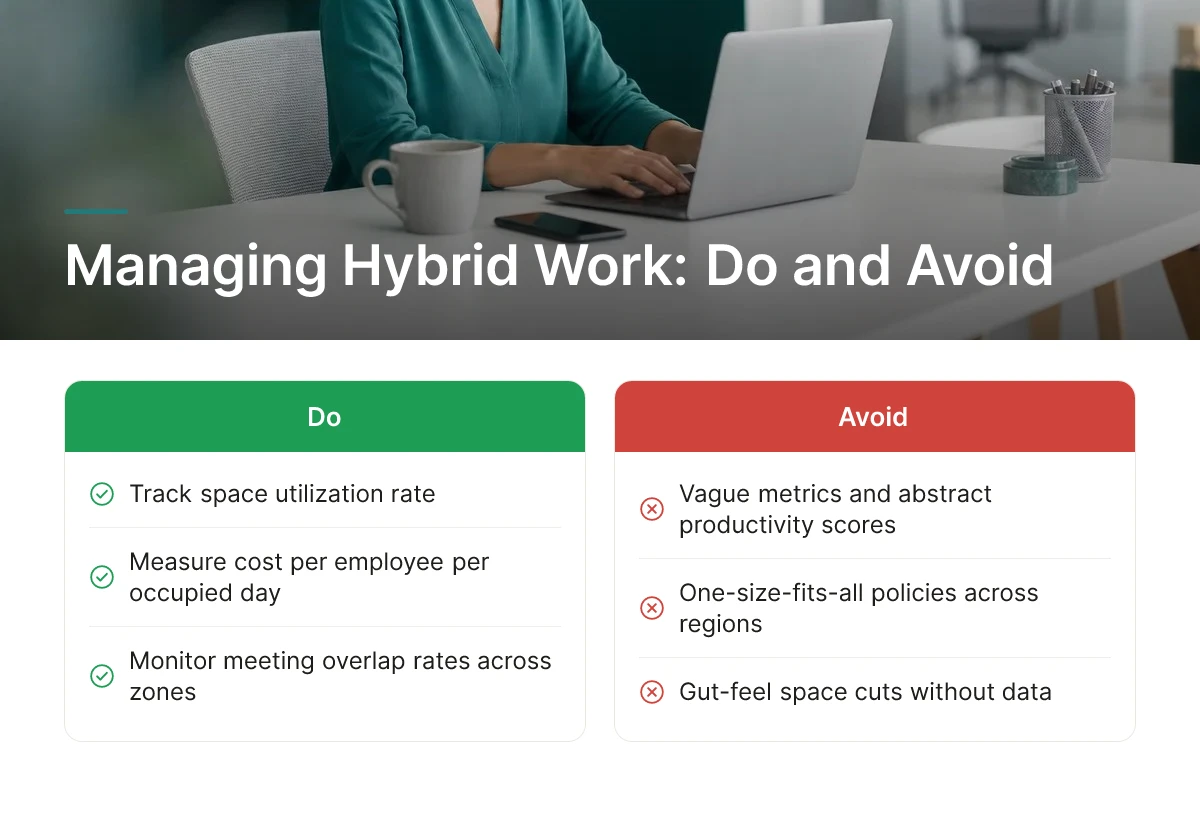
Most failures in how to manage hybrid work come from five repeatable mistakes: vague metrics, uneven performance reviews, one-size-fits-all policy, gut-feel space cuts, and disconnected tools.
Track space utilization rate, cost per employee per occupied day, and meeting or collaboration overlap rate, not abstract "productivity scores" that nobody can audit. Space utilization rate tells you what percentage of available desks or rooms are actually occupied on a given day, which is the number that should drive any consolidation decision. Cost per employee per occupied day reframes real estate spend around actual use rather than headcount, exposing which floors or offices are quietly burning budget. Collaboration overlap rate, how often teammates who need in-person time are actually in the building on the same day, is the figure that correlates with the 88% co-attendance benchmark Upflex customers track, rather than attendance alone. A company can hit 70% badge-swipe attendance and still fail at coordination if the right people never overlap.
Evaluate hybrid and in-office employees on documented outcomes tied to role expectations, not on visibility, because proximity bias quietly rewards people managers simply see more often. A manager who walks past someone's desk five days a week forms an impression of effort that has nothing to do with output, while a remote or hybrid employee delivering the same results gets passed over for stretch projects or promotions. The fix is structural: set outcome-based goals at the start of a review cycle, document progress against them regardless of location, and train managers to separate "I saw them working" from "they delivered the work."
Compliance is the other blind spot. Applying one hybrid policy across the U.S., U.K., and EU without local legal review risks violating labor, tax, or remote-work regulations that vary by jurisdiction, a flexible-hours clause that is routine in one country can trigger overtime liability or permanent establishment tax exposure in another. Global enterprises need local legal sign-off before rolling out a uniform policy, not after an audit flags it.
On the real estate side, the biggest mistake is cutting square footage based on leadership instinct instead of utilization data [3]. Guessing wrong in either direction either strands the company with underused space or leaves employees without desks on peak days, which erodes the in-office experience it was supposed to protect [2]. Finally, adding workplace technology that doesn't integrate with existing booking or calendar tools creates duplicate systems employees stop trusting, and stop using altogether.
Hybrid work typically pays back through reduced square footage, not headcount or revenue changes. Companies that pair attendance forecasting with space consolidation report real estate spend cuts of 40%+ once they right-size leases around actual usage rather than assumed capacity. The bigger driver is usually eliminating underused floors rather than any single tool, so the ROI case should start with your current utilization rate, not the software budget.
Compliance requirements vary by country and can dictate everything from expense reimbursement to data residency for employee location data. Labor laws on working hours, overtime, and remote work stipends differ widely across the European Union, the United States, and Asia-Pacific markets, so a single global hybrid policy rarely works as written. Legal and HR teams typically need jurisdiction-specific addenda covering tax residency triggers, equipment reimbursement, and local data protection rules before rolling out any multi-country hybrid schedule.
Most enterprises settle on two to three in-office days per week, though the right number depends on team function and collaboration needs. A Stanford report found employees working from home two days a week showed productivity comparable to full-time office staff [1]. Engineering and support teams often need fewer in-person days than sales or client-facing roles.
Measure it with occupancy data, not assumptions, badge swipes, desk sensors, and booking records show which floors and days are actually in demand. Utilization data also reveals costly gaps, like energy spent heating or cooling space nobody uses [2]. Platforms that combine this data with attendance forecasting let real estate teams identify underused floors before a lease renewal forces the decision.
The core hybrid workplace best practice across time zones is building overlap windows and defaulting to asynchronous communication outside them. Set clear expectations for response times, document decisions in writing rather than relying on live meetings, and rotate inconvenient meeting slots so no single region always carries the early-morning or late-night burden [5]. Equity in scheduling matters as much as the tools you use [4].
Managing hybrid work well comes down to three decisions: forecast attendance before you plan space, measure utilization instead of guessing, and give employees workspace options that match where they actually are. Companies that skip the forecasting step tend to either overbuild office capacity or force rigid mandates that backfire. Platforms like Upflex address this directly, UnifyAI forecasts attendance with 97% accuracy, and the on-demand workspace network covers employees who aren't near a company office that day.
Start by pulling your last quarter of badge or booking data and comparing it against your current lease footprint before your next renewal date arrives.
Explore more from our content library: