Share This Article
No items found.


Enterprise organizations automate real estate expense tracking by centralizing all location, provider, and workspace costs into one system that syncs automatically with accounting software, replacing manual spreadsheets and siloed invoices from individual landlords or coworking providers. This matters because occupancy spend is typically scattered across dozens of vendors, lease types, and regional currencies, making it nearly impossible to see total cost or negotiate effectively without a unified data layer. Centralized, automated tracking gives finance and real estate teams a single source of truth for every dollar spent on space, updated in real time rather than reconciled at quarter-end.
Before you automate anything, you need clean source data, a complete office and provider inventory, and admin-level access to your accounting systems, without these three, no platform can produce a reliable picture.
Real estate expense tracking only works as well as the inputs behind it. Enterprise teams should gather existing lease agreements and invoice history for every location, a current inventory of owned offices and third-party workspace providers, and administrative access to whatever accounting software runs the back office, NetSuite, SAP, or QuickBooks among the most common [2]. Without this groundwork, even a well-built platform has nothing solid to reconcile against.
Fragmented vendor contracts across offices and coworking providers make manual consolidation unreliable because billing cycles, currencies, and invoice formats rarely match from one provider to the next. A landlord in London invoices quarterly in pounds; a coworking provider in Singapore bills monthly in Singapore dollars with a different line-item structure entirely. Finance teams who try to reconcile this by hand are working against structural mismatches, not just volume, a problem that mirrors what growing companies already face with fragmented software and vendor spend before they centralize it [4]. The more distributed the real estate footprint, the more these formats multiply, and the harder it becomes to answer a basic question: what did we spend on space last quarter, in total?
Getting past this requires more than a tool. It requires agreement across three groups, finance, corporate real estate, and workplace or IT teams, on what data gets tracked, who owns it, and which system becomes the source of truth. Finance cares about general ledger accuracy and audit readiness; corporate real estate cares about lease terms and portfolio decisions; workplace and IT teams care about provider access and system integrations. Align those three before procurement starts, not after.
Audit your current spend visibility gaps before selecting a platform. Map out where data already lives, where it's missing, and where it contradicts itself across systems. Organizations that skip this step often discover mid-implementation that half their coworking invoices were never logged anywhere centrally, a costly correction to make after signing a contract rather than before.
Centralized real estate expense tracking means every lease, utility bill, and workspace invoice from every location flows into one ledger instead of sitting in a regional filing cabinet or a local manager's spreadsheet.
The mechanism is straightforward. Instead of each office, region, or business unit keeping its own records, a central system ingests cost data directly from every site and every workspace provider, landlords, coworking operators, utility companies, and on-demand workspace networks all feed the same ledger. A finance leader reviewing portfolio spend no longer has to request numbers from five regional facilities managers and wait for each one to compile a report. The data is already there, tagged by location, provider, and cost category.
This matters because the alternative, manual tracking, breaks down at exactly the scale where it matters most. A spreadsheet-based approach requires someone to re-enter every invoice line by hand, reconcile currency conversions for international offices, and align billing periods that rarely match across providers [2]. One office's lease might invoice monthly in U.S. dollars while another bills quarterly in euros; a spreadsheet has no built-in way to normalize that, so errors compound as the portfolio grows. NetSuite's real estate accounting research points to exactly this failure mode: fragmented, manual processes lead to delayed financial closes and limited visibility once a portfolio spans multiple properties and entities [2].
Centralization replaces month-end guesswork with a real-time view of total portfolio spend. Rather than waiting for regional teams to roll up their numbers at the close of each month, a centralized system shows current spend across every site the moment a cost is recorded, a shift from periodic reporting to continuous visibility [4].
None of this works without standardized data structures. If one office tags expenses by "department" and another by "cost center," cross-site comparison becomes guesswork rather than analysis. Consistent fields, location, provider, category, billing period, applied uniformly across every office are what let a finance team actually compare New York's workspace costs to London's or Singapore's on equal terms [1]. Upflex approaches this by unifying desk booking, attendance forecasting, and on-demand workspace access into a single office orchestration dashboard, so real estate and finance leaders see utilization and cost data from owned offices and third-party workspaces in one place rather than piecing it together after the fact.

A consistent tagging taxonomy, location, department, and workspace type on every line item, is what turns raw spend data into real estate expense tracking you can actually act on.
Five categories drive most occupancy cost and deserve their own tags rather than a generic "facilities" bucket. Base rent or membership fees sit at the top, followed by utilities, amenities and services (cleaning, security, pantry stock), corporate card spend tied to workspace use, and ancillary fees like day-pass bookings or overage charges at on-demand locations. Lumping these together hides which cost is actually rising and why. For more information, see Real Time Threat Detection.
Split further between dedicated office space and on-demand coworking use, since the two behave differently. A leased floor in Chicago carries fixed rent regardless of attendance, while a flex membership used by traveling sales staff scales with bookings. Tagging each transaction with its workspace type lets finance see cost per square foot alongside cost per booking, side by side.
Tagging by location, department, and workspace type lets finance compare offices on equal footing instead of eyeballing inconsistent monthly reports. Without shared tags, one site might label a conference-room overage fee as "amenities" while another books the identical charge under "miscellaneous", the same cost showing up under two different labels, which quietly breaks any portfolio-level roll-up. A fixed taxonomy, applied before expenses hit the general ledger, closes that gap.
The payoff shows up at the department level. If overage charges spike at a single site, tagging makes it possible to isolate which team is driving the increase, say, a sales group booking last-minute coworking days above its allotment, rather than treating it as an unexplained line-item jump buried in a quarterly statement.
Upflex's office orchestration dashboard applies this structure automatically, tagging desk bookings and on-demand workspace charges by site and department as they occur. That removes the manual reconciliation step most organizations still run in spreadsheets after the fact.
Connect expense data directly to your general ledger and workspace booking tools, and real estate expense tracking stops being a monthly reconciliation project and becomes a continuous, accurate feed. Instead of a facilities manager keying invoice totals into an accounting system line by line, the transaction flows automatically from the source, a corporate card charge, a workspace booking, a vendor invoice, straight into the ledger with the cost center, location, and category already attached.
This matters because real estate costs rarely sit in one system. Lease payments live in accounting software, desk bookings live in a workplace platform, and incidental workspace charges land on corporate card statements. Without a connection between these systems, someone has to reconcile them by hand, which is where errors creep in.
Prioritize three integration capabilities before committing to any platform: direct API connections to major accounting systems, native support for corporate card feeds, and compatibility with the workspace booking tools you already run. An API connection to platforms like NetSuite or similar ERP systems lets expense and lease data post directly to the right accounts without a finance team member exporting and re-importing spreadsheets [2]. Corporate card feed support matters because it captures transactions at the moment they happen rather than waiting for a monthly statement upload. And compatibility with your existing workspace booking system, the tool employees use to reserve desks or book meeting rooms, means utilization data and spend data describe the same activity instead of living in two disconnected records.
Upflex addresses this directly by unifying desk booking, attendance forecasting, and on-demand workspace access in a single office orchestration dashboard, so real estate usage and cost data originate from one coordinated system rather than three separate tools that need manual reconciliation.
Pair corporate card issuance with automated receipt capture, and the reimbursement cycle disappears entirely. Employees working from a third-party workspace or booking incidental services no longer pay out of pocket, submit a paper receipt, wait for approval, and get reimbursed weeks later. The card charge posts directly to the ledger, and receipt-matching software attaches the documentation automatically [5].
Automated syncing reduces reconciliation errors because it removes the step where mismatches usually originate: duplicate manual entry. Every time a number gets typed twice, once into an expense report, again into the accounting system, there's a chance for a transposed digit or a miscategorized cost center. Removing that second entry point removes the most common source of discrepancy in real estate expense tracking [4].
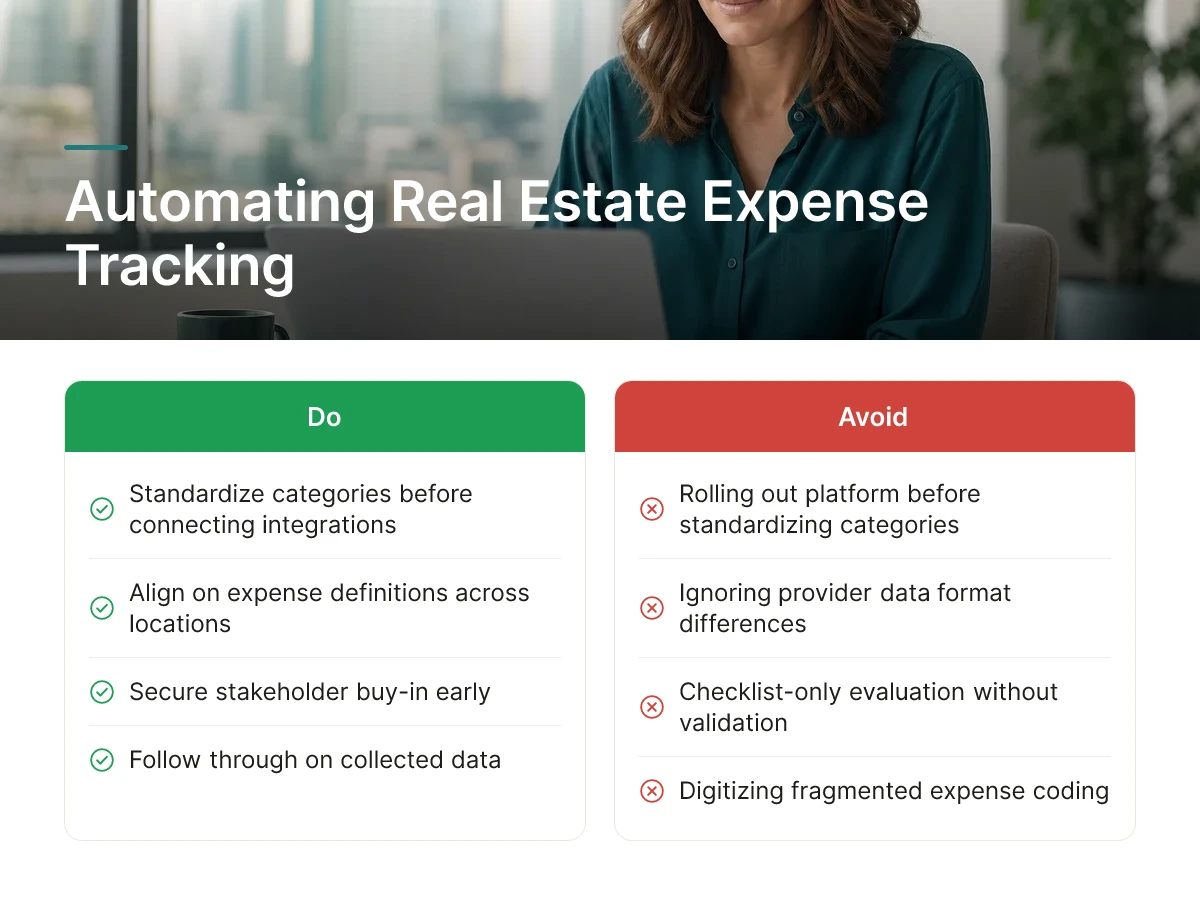
Most failed automation projects fail for the same five reasons: no category standards, ignored provider data formats, missing stakeholder buy-in, checklist-only evaluation, and no follow-through on the data collected.
Rolling out a platform before standardizing expense categories across locations is the most common misstep. If one office codes "workspace membership" as a facilities cost and another books it under travel, the new system just digitizes the same fragmentation [4]. Standardize category definitions and a chart of accounts for real estate spend before connecting a single integration, not after.
Ignoring the native reporting formats used by workspace providers creates a second bottleneck. Every landlord, flex-space operator, and coworking network exports data differently, and teams that don't map these formats upfront end up re-keying numbers into spreadsheets every month [2]. That manual translation step defeats the purpose of automating in the first place and is exactly the fragmented, manual process centralization is supposed to eliminate.
Skipping alignment between finance, real estate, and workplace teams produces inconsistent adoption. Finance wants GL-ready categorization, real estate wants utilization context, and workplace teams want booking visibility, without agreement upfront, each group half-uses the system and the resulting data set has gaps [1]. Involve all three before go-live, not during a later "fix it" phase.
Evaluating platforms purely on feature lists, without testing integration depth against actual badge data, lease systems, or provider APIs, is a common early error. A tool can list every feature on a checklist and still fail to sync cleanly with your existing stack, test the integration before committing [2].
Centralized real estate expense tracking only pays off once someone acts on the data. Consolidated spend and utilization records reveal underused floors, redundant desk inventory, and workspace providers charging premium rates for capacity nobody uses. Upflex pairs utilization data with UnifyAI attendance forecasting, built on 97% forecast accuracy, so real estate and finance leaders can see which locations are overbuilt before a lease renewal forces the decision, a dynamic behind the platform's documented 40%+ reductions in real estate spend. Use the same consolidated view to renegotiate provider terms or consolidate vendors, replacing assumptions about office demand with actual booking and attendance patterns.
Organizations typically see real estate savings alongside administrative time recovered from manual reconciliation work. Upflex customers have documented reductions of 40%+ in real estate spend by combining utilization data with portfolio consolidation decisions. The larger return often comes from faster, better-informed lease renewal and downsizing decisions rather than the tracking process itself.
Prioritize platforms that connect utilization data directly to spend, not just cost reporting in isolation. Look for attendance forecasting that shows which offices are underused, accounting system integration for automated syncing, and visibility across both owned offices and on-demand workspace usage in one dashboard rather than separate tools.
Automated syncing pushes transaction data straight into the general ledger, removing the need for finance teams to re-key figures from spreadsheets [2]. This cuts errors from manual entry and shortens the financial close, since expense data arrives categorized and tagged to the correct cost center or property already.
Organizations tag each expense to a department, location, or workspace type at the point of transaction rather than sorting it after the fact [5]. Consistent tagging rules, applied automatically by the software, let finance teams compare spend across owned offices and on-demand workspace use without manual reclassification.
Centralized, automated expense tracking turns scattered lease invoices, badge data, and booking records into one source of truth finance and real estate leaders can act on. The organizations that get the most value connect spend data to actual utilization, sync transactions automatically into accounting systems, and categorize costs consistently across every location and workspace type. That combination is what turns a reporting exercise into a real estate consolidation decision backed by numbers. Start by auditing where your current expense data lives and how many manual steps separate a booking from a ledger entry, then evaluate a platform, such as Upflex, that unifies utilization forecasting with expense visibility in a single dashboard.
Explore more from our content library: