Share This Article
No items found.

Understanding how to track employee workspace usage is essential. You track employee workspace usage without surveillance by measuring spaces, not people, using anonymized occupancy sensors, badge-swipe aggregates, or booking-system data to see which desks, rooms, and floors get used, when, and how often. The goal is optimizing real estate costs and hybrid work efficiency, not monitoring individual activity. Aggregate occupancy patterns (not identity-linked logs) tell you which floors to consolidate, which room types to add, and where utilization falls short of capacity, all without tracking what any one employee does.
Before you track employee workspace usage, assemble three things: a defined set of occupancy metrics, a chosen data source, and sign-off from HR and legal on privacy terms.
Workspace usage tracking measures space, not people. It aggregates how often desks, rooms, and floors get used, it does not log which employee sat where or for how long. Framing the project this way from day one avoids the most common rollout mistake: employees assuming a new sensor or app is there to monitor their individual activity, when its actual job is to tell facilities teams which floors sit empty on Tuesdays.
Decide upfront on four core metrics, because the data source you pick later depends on what you need to measure. Peak occupancy (the busiest moment in a day) and average occupancy (the typical load) tell different stories, a floor that peaks at 90% but averages 40% is a scheduling problem, not a space problem. Desk utilization rate (desks occupied versus desks available) flags which neighborhoods are overbuilt. Room-type demand, small huddle rooms versus large conference rooms, shows whether your room mix matches how teams actually collaborate. Day-of-week patterns round out the picture, since most hybrid offices see sharp peaks midweek and near-empty floors on Mondays and Fridays [2].
Occupancy data turns space planning from a guess into a decision backed by evidence, since hybrid schedules make fixed headcount-based planning unreliable [2]. You'll also need three inputs ready before any sensor or software goes live: an up-to-date floor plan and space inventory, a chosen data source (badge-swipe aggregates, occupancy sensors, or desk-booking software), and a written privacy policy describing what's collected and why. Get sign-off from HR and legal before deployment, and communicate the plan to staff, a late or absent announcement is what turns a space-optimization project into a trust problem. Done right, the resulting data feeds directly into consolidation and hybrid-policy decisions, the kind platforms like Upflex use alongside attendance forecasting to support real estate footprint reductions of 40% or more.
Deploying a system to track employee workspace usage takes five sequential steps: audit, choose a method, integrate, pilot, and communicate before scaling company-wide.
Most corporate real estate teams skip straight to buying sensors or booking software. That's a mistake. Without a clear inventory and clear rules for how data gets aggregated, you end up with numbers nobody trusts and a rollout employees resent. The sequence below treats tracking as a change management project, not just a hardware install.
Integration means feeding occupancy data directly into the booking and scheduling platform your employees already use, so utilization numbers inform real-time desk assignment instead of sitting in a separate report. A legacy IWMS like Archibus or Planon often can't absorb live sensor feeds without custom middleware, which is why many real estate teams end up layering a newer platform on top rather than ripping out the old one. Upflex approaches this by combining UnifyAI's attendance forecasting, built to predict office attendance with 97% accuracy, with the desk booking workflow itself, so occupancy data and booking data live in one dashboard rather than two disconnected systems. That matters at the pilot stage described above: if your test floor's usage data can't flow into the same tool employees use to reserve a desk, the pilot will tell you less about actual behavior than it should. Nuvolo's research on hybrid office planning makes a similar point, fixed seating assumptions break down once occupancy varies by hour, day, and team, and only a connected data approach catches that variation [2].
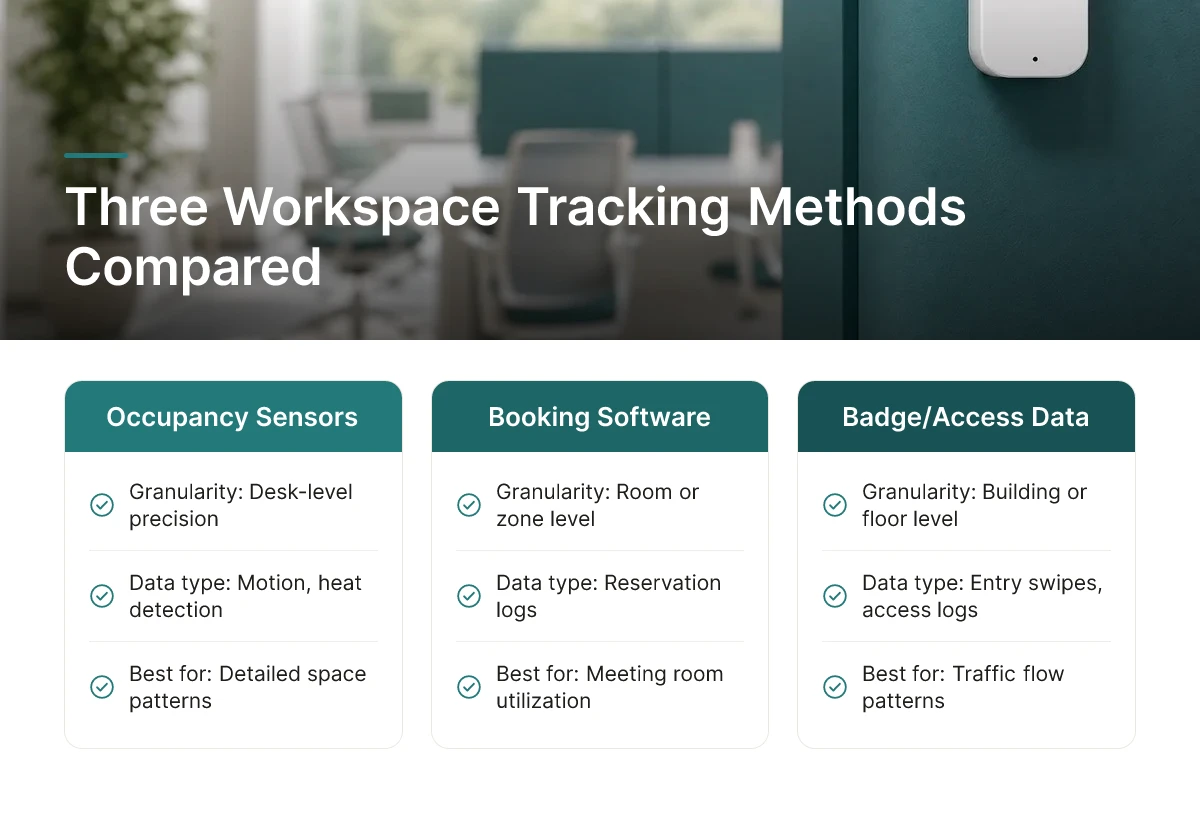
Three technology categories dominate how to track employee workspace usage today: occupancy sensors, booking software logs, and badge/access-control data, each with a different accuracy-to-cost tradeoff.
None of the three is universally correct. The right choice depends on office layout, how much hardware budget you have, and whether you need desk-level precision or just building-level traffic patterns.
Sensor-based systems, motion detectors, heat sensors, under-desk occupancy sensors, deliver the most granular data, often down to a single desk or conference room at a specific hour. Spacewell notes that measuring utilization this way goes beyond simply counting available desks or rooms; it captures actual usage patterns and occupancy rates in real time [4]. The tradeoff is upfront cost: hardware installation, wiring, and ongoing maintenance across every floor add up, which makes sensors a bigger capital decision than a software subscription.
Software and booking-system data is the cheapest entry point because it rides on tools you likely already run, desk reservation platforms, room-booking calendars, check-in apps. The catch is that booking data measures intent, not presence. An employee who reserves a desk and never shows up still counts as "utilized" in the log, which inflates occupancy figures unless the system requires active check-in.
Badge and access-control data uses infrastructure already sitting in most corporate buildings, the same card readers that enable doors. It's strong for understanding floor-level and building-level entry patterns: how many people badged into Building C on a Tuesday, for example. It's weak for anything finer. Badge data can't tell you whether someone sat at desk 14B or spent the day in a phone booth.
Match the method to the floor plan rather than picking one system for the entire portfolio. Open-plan, hot-desking environments favor sensors because unassigned seating makes booking and badge data too coarse to show which desks actually get used [2]. Meeting-room-heavy offices do well with booking software, since conference rooms are inherently reservation-based and software captures that behavior without added hardware. Multi-tenant or multi-building portfolios lean toward badge aggregation, which scales across locations without installing sensors in every space JLL's occupancy research cites as part of the 87% of companies now running hybrid programs [2].
For most hybrid and flexible models, combining a lightweight method, badge or booking data, with periodic sensor spot-checks outperforms relying on one heavy system alone. The lightweight layer tracks broad attendance trends cheaply and continuously; targeted sensor deployments in a subset of high-traffic zones validate whether the booking or badge numbers reflect real presence. Upflex's UnifyAI engine applies this layered logic by forecasting attendance from scheduling and utilization inputs with 97% accuracy, then feeding that forecast into desk booking and office orchestration workflows, giving real estate leaders a single view without instrumenting every square foot.
ROI comes from connecting occupancy numbers directly to lease decisions, facilities spend, and employee satisfaction, not from collecting more data than you need. Knowing how to track employee workspace usage only pays off once the data informs a specific decision: shrink a floor, redesign a room, or fix a recurring desk shortage.
Start with the clearest signal: a floor or wing running at consistently low occupancy is a candidate for consolidation. If a 40,000-square-foot wing sits at 20% utilization for three straight months, that space is a lease cost or an operating expense you can avoid by subletting, closing, or reallocating it to another function. The savings scale with the square footage removed, a single-floor consolidation sits at the budget-friendly end of the outcome range, while exiting an entire underused building moves into premium-tier savings territory. Industry benchmarks show 87% of companies have already adopted hybrid work [2], which means most corporate real estate teams are sitting on exactly this kind of consolidation opportunity today.
Room-type mix is the second lever. Occupancy data typically shows large conference rooms booked far less than their capacity suggests, while small focus pods and two-person huddle rooms stay full [3]. Right-sizing around that pattern, fewer oversized conference rooms, more focus pods, cuts both the one-time build-out cost and the ongoing facilities cost of heating, cooling, and furnishing space nobody uses.
The third return is harder to put a number on but just as real: employee experience. When space supply tracks actual hybrid attendance patterns, employees stop showing up to find every desk taken. That "no desk when I come in" friction is one of the more common complaints driving dissatisfaction with return-to-office policies [1], and it's avoidable once attendance forecasting and desk inventory are aligned rather than guessed at separately.
Occupancy tracking stays defensible when it follows four principles borrowed from GDPR-style data protection frameworks: collect only what you need (data minimization), report at the floor or team level rather than the individual (aggregation), delete raw data on a defined schedule (retention limits), and use the data only for the stated workplace planning purpose (purpose limitation).
Practically, that means anonymizing badge or sensor data at the point of collection wherever possible, publishing a short plain-language policy describing what's collected and why, and giving employees visibility into that policy before rollout, not after a complaint. Upflex's occupancy and attendance forecasting is built around this same aggregated, planning-focused model: the goal is predicting where teams will show up, not monitoring who sat where. That distinction is what keeps workspace analytics a cost-optimization tool instead of a surveillance one.
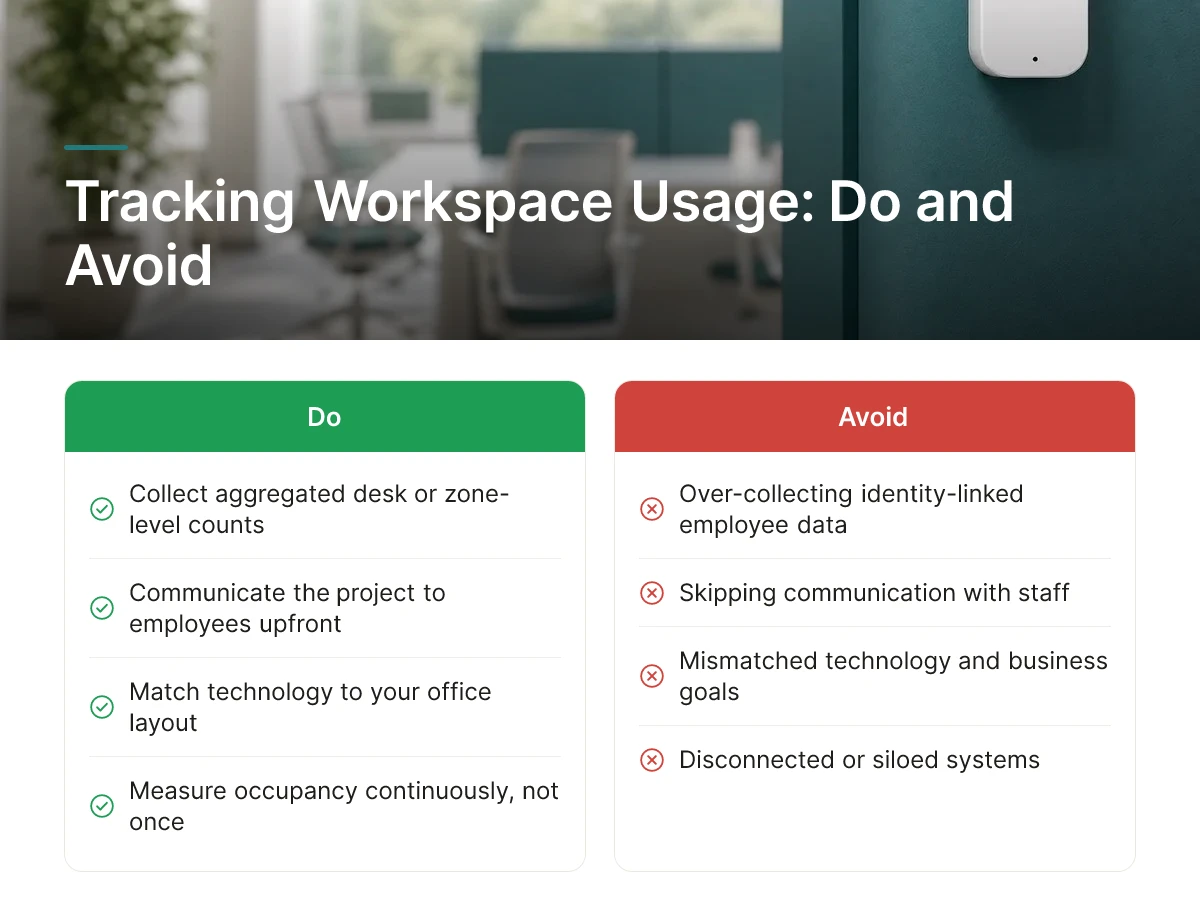
Most failed rollouts trace back to five repeatable errors: over-collecting identity data, skipping communication, mismatched technology, one-time measurement, and disconnected systems.
The costliest mistake in how to track employee workspace usage is defaulting to identity-linked data, badge swipes tied to named employees, Wi-Fi logs mapped to individual devices, when aggregated desk or zone-level counts answer the same business question. Identity-linked tracking triggers consent requirements and data-protection obligations under regimes like GDPR that aggregated occupancy data simply doesn't. If the goal is deciding whether to consolidate a floor, you need to know that 40% of desks sat empty on Tuesdays, not which employee skipped the office. Collecting more than that creates legal exposure with no analytical upside.
A second common failure: rolling out sensors or badge readers without telling anyone why. Employees who discover tracking after the fact assume the worst, even when the system only reports aggregate counts. Communicating the purpose, scope, and privacy boundaries before go-live is cheap insurance against a workplace controversy that can stall a project for months.
Technology mismatch is a quieter but equally damaging error. Badge data tells you who entered a building, not which desk they used, useless for a hot-desk floor where assignment changes daily [5]. Sensor-based occupancy counting or desk-booking software pairs better with unassigned seating, while badge data works fine for measuring building-level attendance. Choosing the wrong tool for the space type produces data nobody can act on.
Treating the rollout as a one-time audit rather than a recurring process is another frequent misstep. Hybrid attendance patterns shift by season, team, and policy change, so utilization data from a single two-week snapshot goes stale fast [2]. Space strategy needs regular review cycles, not a one-and-done report.
Finally, running occupancy sensors in isolation from existing desk-booking and HR systems creates duplicate records that contradict each other, one system says a desk is booked, another says it's empty, and nobody trusts either. Upflex addresses this directly by combining its UnifyAI forecasting engine with desk booking in a single dashboard, so attendance predictions, reservations, and actual usage sit in one data set instead of three disconnected ones.
It measures how physical space gets used, desk occupancy, meeting room turnover, floor-by-floor attendance patterns, not what employees do at their desks. The goal is square-footage efficiency, not productivity surveillance. Data comes from badge swipes, sensors, and booking systems, aggregated to show which spaces sit empty and which are overbooked.
Requirements depend on jurisdiction and what data you collect, but transparency is standard practice regardless of legal minimums. Aggregated occupancy counts typically carry lighter compliance burdens than individual-level tracking tied to a specific person's badge or device. Most organizations publish a workplace data policy and loop in HR and legal before rolling out sensors or booking systems company-wide.
Yes, aggregated, anonymized occupancy data is usually all you need to make real estate and layout decisions. You don't need to know which employee sat where; you need to know that the third floor runs at 20% capacity on Mondays. Floor- or zone-level reporting protects privacy without sacrificing decision quality.
Most organizations see actionable data within a few weeks, but real estate decisions, consolidating a floor or exiting a lease, typically play out over one to two quarters. Early wins come from reallocating underused meeting rooms; larger savings follow lease cycles and renewal timing [2].
Workspace tracking measures how space is used in aggregate; employee monitoring tracks individual activity, often on devices or networks. The two serve different leaders for different reasons, one feeds real estate and workplace strategy decisions, the other feeds compliance or productivity oversight. Upflex, for example, focuses on occupancy and attendance forecasting, not individual activity surveillance.
Tracking workspace usage comes down to three moves: collect occupancy data from badges, sensors, or booking tools; analyze it at the floor and team level rather than the individual level; and act on it before your next lease renewal, not after. Most companies still plan space around headcount instead of actual attendance patterns [2], which is exactly the gap that creates both wasted square footage and employee frustration over desk availability.
Start by pulling your last 90 days of badge or booking data and mapping occupancy by day of week. That single exercise usually reveals which floors or zones to target first.
Explore more from our content library: