Share This Article
No items found.


A workplace orchestration platform consolidates fragmented booking tools, space-management software, and real estate data into one coordinated system so hybrid work runs without manual back-and-forth between apps. Instead of HR, facilities, and IT each running separate tools that don't talk to each other, orchestration connects them so attendance data, space availability, and employee scheduling update in sync. The payoff is fewer double-bookings, more accurate space utilization data, and real estate decisions based on actual usage rather than guesswork.
Consolidation starts by connecting existing booking, space, and HR systems through APIs and data sync rather than ripping them out and starting over.
Most enterprises running hybrid work end up with a patchwork: one tool for desk booking, another for meeting rooms, a separate visitor management system at reception, and a real estate portfolio tool that the facilities team updates manually every quarter. None of these share data by default. A desk reserved in the booking app doesn't show up in the space-utilization dashboard, and the real estate team is left reconciling spreadsheets to figure out which floors are actually being used.
An integration layer solves the data-sharing problem, not the tool-count problem. APIs pull booking events, badge swipes, and calendar data into a shared layer so a reservation made in one system reflects instantly everywhere else. A workplace orchestration platform acts as that shared layer, it doesn't replace every point tool overnight, but it becomes the place where booking, occupancy, and scheduling data converge so facilities, HR, and finance are looking at the same numbers instead of three different ones.
Plan for syncing, not rebuilding, employee records, org charts, and schedules from systems like Workday or SuccessFactors.
The integration work typically involves connecting to the HR information system to pull in team structures, manager hierarchies, and location assignments, then keeping that data current as people change roles or teams. This matters because attendance coordination only works if the platform knows which employees belong to which team and where they're expected to work. IT and workplace teams should expect a scoping phase that maps which fields need to sync in real time (new hires, terminations, location changes) versus which can refresh on a daily batch.
AI coordination reads attendance patterns across teams to predict demand and adjust space allocation before conflicts happen, rather than after.
Instead of treating each booking as an isolated transaction, the system looks at historical attendance by team, day of week, and location to forecast who's likely to show up and when. Upflex's UnifyAI engine, for example, uses this approach to forecast attendance with 97% accuracy, which lets facilities teams adjust desk allocation and room availability ahead of demand instead of reacting to double-bookings after the fact.
The distinction worth making is between point-to-point integrations, where two tools exchange data for one specific purpose, and a true coordination hub that becomes the system of record for occupancy across the entire portfolio. Point-to-point connections solve narrow problems but multiply maintenance overhead as more tools get added. A coordinated hub centralizes occupancy data once, so every downstream decision, from desk allocation to lease renewal, pulls from the same source.
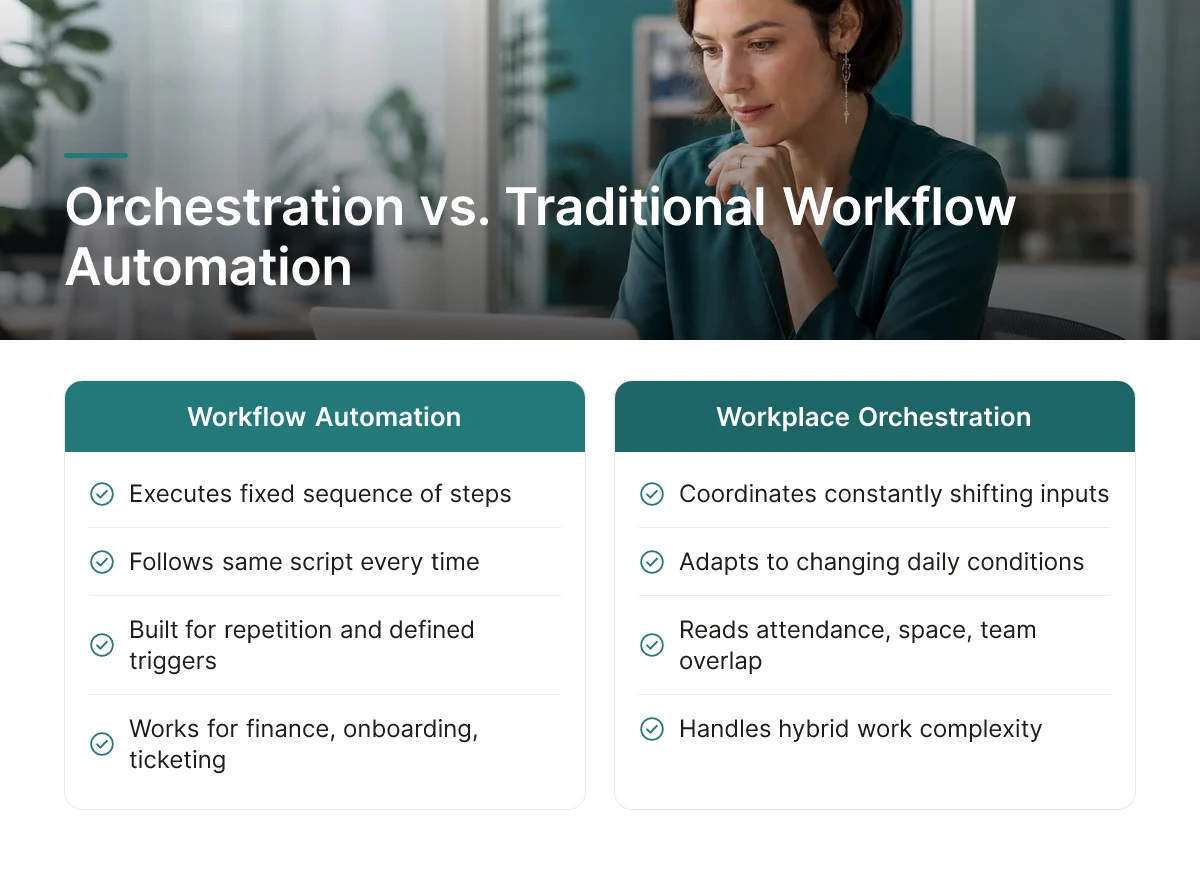
Workflow automation executes a fixed sequence of steps; workplace orchestration coordinates constantly shifting inputs like attendance, space availability, and team overlap. One follows a script. The other reads a room that changes every day.
Business process management (BPM) and robotic process automation (RPA) tools are built for repetition. They take a defined trigger, an invoice arrives, a form gets submitted, and run the same steps every time, in the same order, until someone changes the script. That model works well for finance approvals, onboarding paperwork, or IT ticketing. It does not work well for deciding whether there's a free desk for a product team that just added three people, or whether Tuesday's office headcount will overwhelm the parking garage.
RPA-only tools handle rule-based, repetitive tasks reliably, but they don't adapt when occupancy shifts or when two teams want the same conference room on the same day. A bot can route a badge request or auto-approve a desk reservation under preset conditions. It can't forecast that Thursday's attendance will spike 20% above a normal week and suggest opening a second floor, because that requires reading live signals, not executing a static rule.
Workplace coordination depends on continuous two-way data flow, attendance figures change daily, sometimes hourly, as plans shift and people work from home instead. Traditional automation runs on one-way trigger-action logic: event happens, action fires, done. A workplace orchestration platform instead has to ingest new information constantly, who's badging in, which desks are booked, which teams have flagged an in-office day, and recalculate recommendations as conditions change. Upflex's UnifyAI engine, for example, processes scheduling and utilization data to forecast attendance with 97% accuracy, a task that depends on continuously updated inputs rather than a one-time trigger.
These two approaches aren't competitors. Orchestration typically sits on top of existing BPM and RPA tools, coordinating outcomes across booking systems, badge data, and HR calendars rather than replacing the automation already running inside each one. The conflict only appears when a company tries to force a rigid, sequential tool to solve a problem that's inherently live and relational.
A workplace orchestration platform fixes the mismatch between what your booking tools report and what's actually happening on the floor, where desks sit empty while meeting rooms overflow.
Without coordinated systems, three failures repeat on a weekly cycle. Desks go unbooked in one zone while employees hunt for seats in another, because no single system tells anyone where the imbalance is happening in real time. Teams show up on different days than their collaborators, missing the in-office overlap that justified the commute in the first place. And facilities managers plan cleaning, catering, and floor capacity off badge swipes or stale spreadsheets instead of what teams actually intend to do that week.
These aren't separate problems, they're symptoms of the same root cause. Booking data, attendance forecasts, and real estate plans live in disconnected systems that never reconcile with each other.
Coordinated tool data turns real estate decisions from guesswork into evidence, letting teams cut underused square footage based on actual attendance instead of outdated lease assumptions. When desk booking, attendance forecasting, and space data run through one system instead of three, real estate leaders can see which floors, which days, and which teams are driving actual occupancy.
Upflex's UnifyAI engine, for example, forecasts attendance with 97% accuracy by processing scheduling and utilization data together, giving real estate teams a defensible basis for consolidation decisions rather than a hunch about which office to shrink. Customers using this kind of coordinated data have documented real estate spend reductions above 40%, a figure that holds up because it's tied to measured usage, not projected headcount.
Three patterns signal you've outgrown point fixes: multiple disconnected booking tools covering different buildings or regions, facilities and HR working from different headcount numbers in planning meetings, and recurring space conflicts even though overall occupancy sits well below capacity. If your conference rooms are booked solid on Tuesdays while your badge data shows 40% utilization building-wide, that's not a booking problem, it's a coordination gap.
Utilization data, once consolidated, feeds directly into lease negotiations and portfolio consolidation calls. Real estate leaders walk into renewal conversations with actual attendance patterns instead of assumptions, giving finance and CRE teams a shared basis for deciding which locations to keep, shrink, or exit.
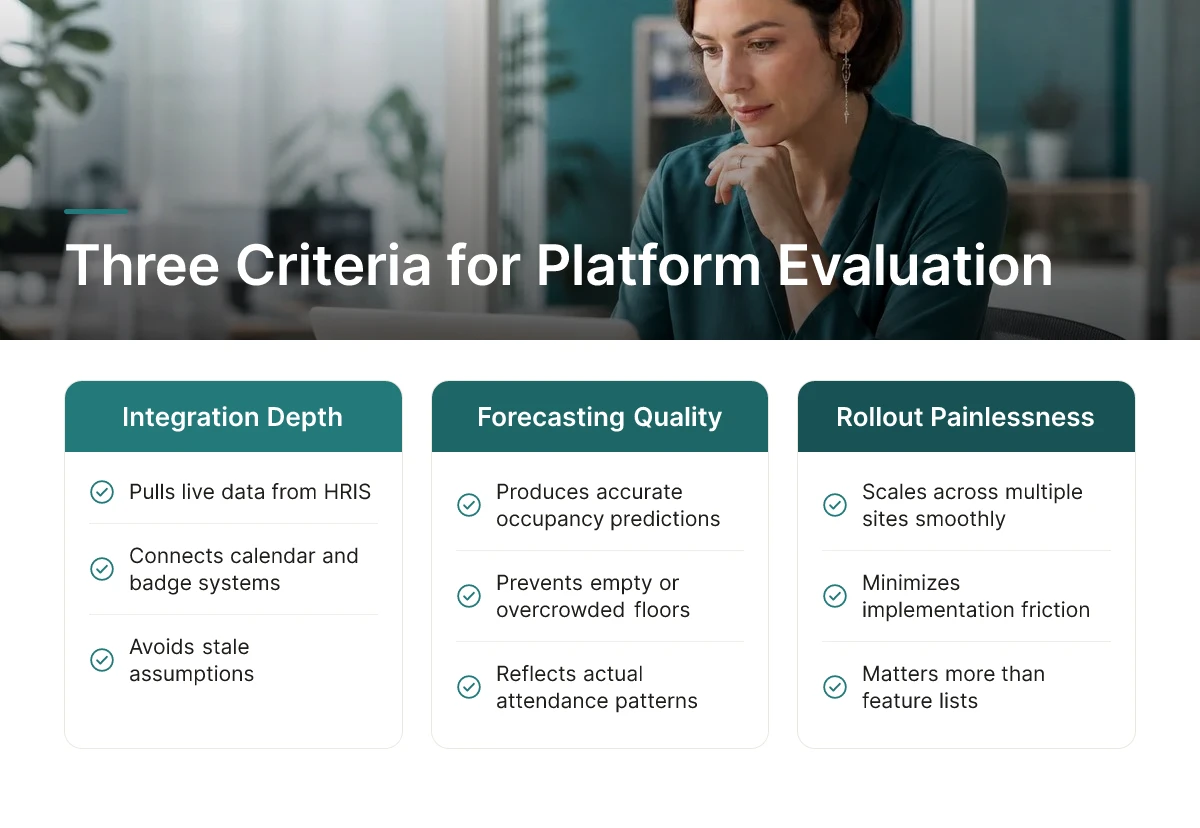
Score vendors on three things: how deeply they integrate with your existing booking and HR systems, how accurate their occupancy forecasting actually is, and how painless rollout will be across multiple sites.
Those three criteria matter more than any feature list. A workplace orchestration platform that can't pull live data from your HRIS, calendar system, and badge access logs will always be working from stale assumptions. And stale assumptions produce bad forecasts, which means employees still show up to offices with no open desks or empty floors nobody planned for.
Ask vendors for a list of native integrations with the HR information systems, calendar platforms, and badge or access-control systems you already run, not a roadmap promise, a current list. Then ask how forecasting accuracy is measured and over what time horizon; a platform that only predicts aggregate daily headcount is solving a different problem than one that predicts team-level co-attendance a week out. Forecasting quality is the mechanism that determines whether your space decisions are grounded in real patterns or guesswork [3].
Expect data migration and HR system synchronization to take longer than the booking-tool setup itself, often by a wide margin. The desk-booking interface can usually go live within weeks, but getting employee records, org hierarchies, and location data clean enough to sync reliably is the part that stretches timelines.
A phased rollout, by site, region, or department, tends to cause less disruption than a single big-bang launch across every office at once. Phasing lets your facilities and IT teams catch integration issues, fix data mismatches, and adjust change-management messaging before the next site goes live. Vendors like OfficeSpace position fast go-lives, citing rollouts in 35 days or less [2], but that figure typically covers initial software deployment, not full HR data sync across a global portfolio.
Pricing in this category tends to fall into budget-friendly, mid-range, and enterprise tiers, scaled by number of locations, headcount, and how many systems need to connect. A single-site deployment with basic booking needs costs far less to implement than a global rollout spanning dozens of offices with deep HRIS integration and custom forecasting requirements. Treat cost conversations as a function of scope, not a flat subscription number.
Adoption failure is usually a people problem, not a software one. Before signing, ask how the vendor supports change management, training materials, manager playbooks, communication templates, because the best forecasting engine does nothing if employees ignore the booking tool. Upflex addresses this by pairing its UnifyAI forecasting engine with desk booking and on-demand workspace access in one dashboard, reducing the number of separate tools employees need to learn and lowering the chance that rollout stalls on confusion rather than capability.
Consolidating workplace systems shows up in four places leadership already tracks: real estate cost per square foot, employee time lost to scheduling friction, how fast facilities teams can justify portfolio decisions, and total software spend.
Accurate attendance forecasting is the mechanism behind the first one. When a corporate real estate team sizes an office around static headcount, it pays for desks that sit empty three or four days a week. When forecasting reflects actual attendance patterns instead, real estate decisions track demand that actually shows up, not the number on an org chart. That's the logic behind Upflex's UnifyAI engine, which forecasts attendance at 97% accuracy so portfolio decisions get made against real usage data rather than guesswork.
Reduced double-bookings and scheduling conflicts produce a quieter but real gain: recovered employee time. Every conflict resolved by a facilities admin, or every employee who shows up to a pre-booked desk already taken, is friction that compounds across thousands of employees over a year. Fewer conflicts mean fewer support tickets reaching the facilities team and fewer minutes lost to re-booking, time that shows up nowhere on a balance sheet but drains productivity all the same.
The clearest ROI signal is fewer tools to license, administer, and reconcile, not a headline percentage pulled from a vendor deck.
When badge data, desk booking logs, and attendance spreadsheets live in separate systems, someone on the real estate or facilities team spends hours each month reconciling numbers that should already match. A workplace orchestration platform that unites booking, forecasting, and network access removes that reconciliation work entirely, because the utilization view is already single-source. That consolidated reporting is also what shortens the path from "we think this floor is underused" to a lease decision backed by data, real estate leaders no longer need to stitch together three exports before they can present to the CFO.
Upflex frames this outcome directly: organizations using the platform to consolidate real estate decisions have documented reductions of 40%+ in real estate spend, alongside 88% co-attendance achievement against team collaboration targets.
These gains compound. Forecasting accuracy improves as the system accumulates more usage history, which means the second year of consolidation tends to outperform the first, not because the mechanism changed, but because the data behind it got deeper.

In most cases, yes, a coordination platform that includes desk and room booking can absorb that function rather than running alongside it. Upflex, for example, unites booking, attendance forecasting, and workspace network access in one dashboard, which removes the need for a separate reservation tool and the integration work that comes with keeping two systems in sync.
Yes, though the payoff is smaller than for multi-site enterprises. A single office still benefits from attendance forecasting and desk booking to fix overcrowding or underuse, but the bigger gains, portfolio consolidation, cross-location coordination, require more than one site to apply.
Most teams reach steady usage within four to six weeks if the rollout includes clear communication and manager buy-in. Adoption moves faster when the tool replaces a clunky spreadsheet or badge-based process employees already dislike, and slower when it's introduced alongside a new attendance mandate.
Reputable vendors will migrate or export historical utilization data so you don't lose your baseline for comparison. Confirm data portability and format before signing a contract, this protects your ability to measure year-over-year progress regardless of which platform you use next.
Fragmented booking tools, badge logs, and spreadsheets can't tell a corporate real estate leader whether a lease renewal should become a downsize. Coordinating attendance forecasting, desk booking, and external workspace access in one system does. The leaders who move fastest treat utilization data as a continuous input to real estate decisions, not a quarterly report nobody reads.
Start by pulling your last two months of desk and room booking data into one spreadsheet, if that's already a manual chore across three tools, you've found your first business case for consolidation.
Explore more from our content library: