Share This Article
No items found.

Effective desk booking system software combines real-time availability, flexible and assigned seating management, deep calendar integration, mobile access, and occupancy analytics into one platform. The strongest systems also use AI to forecast attendance and auto-optimize space, rather than just letting people reserve a desk. For hybrid teams, the right mix of these capabilities determines whether the office runs on guesswork or on data, directly affecting real estate costs and employee experience.
Desk booking system software needs a live map of which desks are booked, free, or occupied right now, not a static floor plan updated once a week.
Real-time status comes from check-in triggers: an employee badges in, scans a QR code, or confirms a reservation on arrival, and the system updates instantly. This live layer is what makes hot-desking, desk hoteling, and neighborhood-based seating actually workable, since employees can see true availability instead of guessing from a chart that was accurate on Monday but not Wednesday [2].
This capability matters most for fast-growing or high-turnover teams where in-office days shift week to week and a fixed seating plan breaks down fast. A static spreadsheet or printed map simply can't keep pace with that kind of change.
The differentiator to look for: automatic release of no-show desks after a grace period. Without it, a desk reserved by someone who never shows up stays locked for the whole day, which defeats the purpose of flexible seating and frustrates everyone else trying to find a spot [1].
The strongest desk booking system software handles assigned seating and flexible booking at the same time, since most hybrid offices need both models running in parallel.
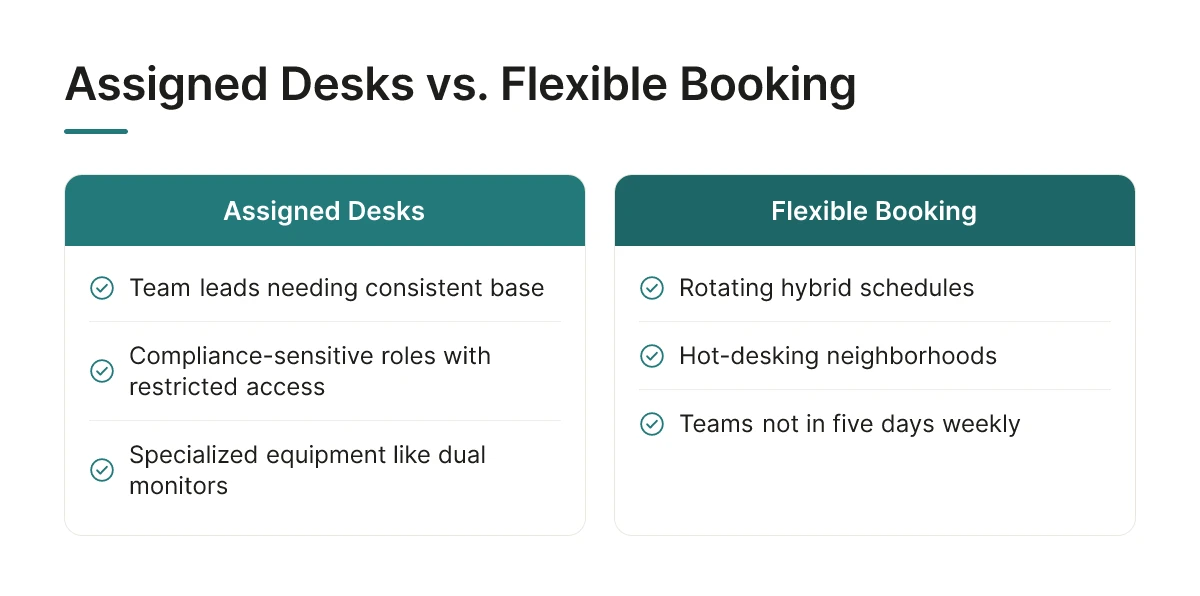
Assigned desks still make sense for team leads who need a consistent base, compliance-sensitive roles with restricted data access requirements, and anyone tied to specialized equipment like dual monitors or accessibility hardware. Flexible booking wins for rotating hybrid schedules and hot-desking neighborhoods where no one is in five days a week and desks should serve whoever needs them that day [3].
Most organizations don't convert an entire office overnight, they shift floor by floor as hybrid policy matures and leadership gets comfortable with the data. This capability suits organizations making that gradual transition rather than flipping every seat to open booking on day one.
The differentiator: systems that let admins set a desk-type ratio per floor, say, 30% assigned, 70% bookable, and adjust that ratio as policy evolves, instead of forcing one fixed setting across the entire office.
Desk booking should happen inside the calendar employees already use, not on a separate app they have to remember to open.
Most mature platforms support out-of-the-box connections to Microsoft 365, Outlook, and Google Calendar, letting employees reserve a desk directly from a meeting invite or their daily agenda without switching tools [4].
Integration depth varies more than vendors advertise. Some tools offer one-way calendar sync that only pushes bookings outward; others support two-way updates, so a canceled meeting or a deleted booking reflects instantly on both sides instead of leaving a stale reservation on the books [4]. Organizations with an established collaboration suite should confirm which type they're getting before committing, since shallow sync creates more admin cleanup than it saves.
The differentiator: platforms that suggest desks based on who else on a shared calendar invite is actually coming in that day, not just a generic list of open desks. That turns booking into a coordination tool, not just a reservation form.
Syncing desk booking system software with HRIS and payroll data keeps eligibility, team assignments, and office locations accurate without manual upkeep.
HRIS sync automatically updates who's allowed to book a desk, which team they belong to, and which office location applies to them, no admin has to manually add or remove names as staff changes happen. New hires and role transfers propagate straight from the HR system into the booking platform instead of requiring a separate provisioning step someone has to remember to run.
This matters most for mid-size and enterprise organizations where headcount and org-chart changes happen weekly, not quarterly. A manual process that works for 50 employees breaks down fast at 5,000.
The differentiator: systems that use HRIS data to automatically group desk neighborhoods by team, rather than making a facilities admin build and rebuild seating charts by hand every time a reorg happens.
A desk booking app needs to work without a live connection, since employees often book, check, or cancel desks while commuting underground or on spotty transit wifi.
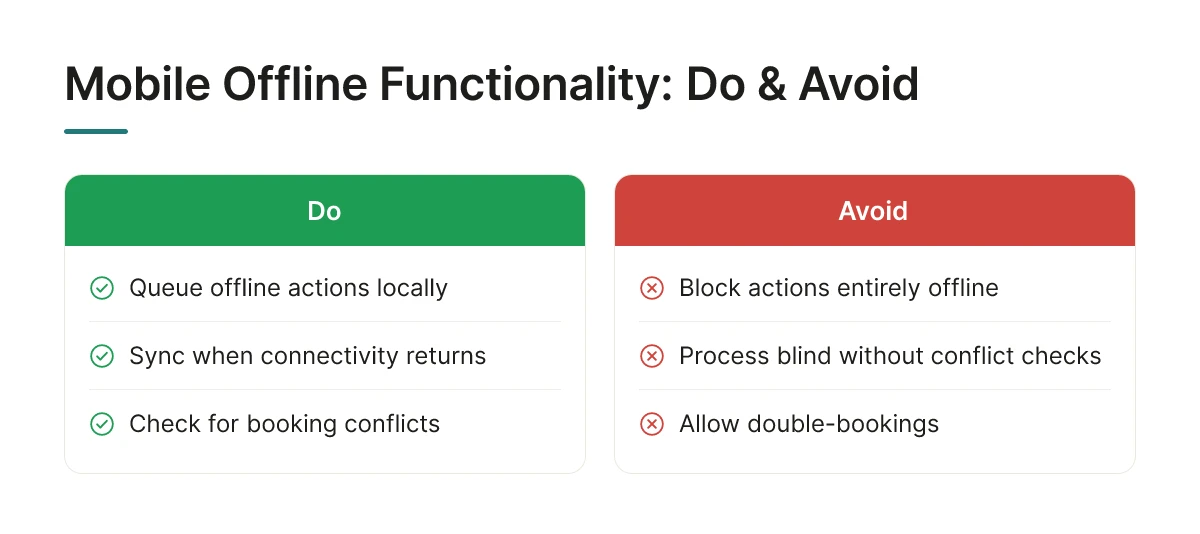
The baseline expectation is a mobile app; the real differentiator is what happens when that app can't reach the server. Reliable platforms queue offline actions locally and sync them the moment connectivity returns, checking for conflicts so two people don't end up booked into the same desk [5]. Fragile platforms either block the action entirely or let it process blind, creating double-bookings that surface only when someone arrives at an occupied desk.
This capability matters most for distributed teams and field employees splitting time between client sites, home, and the office, where connectivity is inconsistent by nature.
The differentiator: look for platforms that support QR-code check-in at the desk itself as a fallback, so an employee can confirm arrival even when the app has no signal at all.
Occupancy analytics turn raw booking logs into evidence by comparing how many desks were reserved against how many were actually used, exposing gaps that drive real estate decisions.
Good reporting tracks three things: the booked-versus-occupied gap, peak attendance days, and zones that sit empty week after week. A floor that shows 70% bookings but 40% actual badge-ins signals a no-show problem, not a capacity problem [1]. Patterns like this, tracked over months rather than a single audit week, give workplace teams the confidence to consolidate a floor or walk into a lease renegotiation with data instead of a guess.
This reporting layer matters most for workplace and real estate teams who need ongoing evidence, not a one-time snapshot. Desk booking system software that only reports daily counts misses the slower patterns, a team that books Mondays but shows up Wednesdays, or a department whose attendance has quietly dropped over a quarter.
The differentiator worth checking for: platforms that flag chronic no-show patterns by team or department automatically. That turns a vague policy debate about hybrid attendance into a conversation anchored in actual behavior.
AI forecasting predicts who's coming into the office before the day arrives, rather than just showing which desks are free once someone books one.
Basic booking calendars are reactive: an employee opens an app, sees open desks, and reserves one. Forecasting models work ahead of that moment, pulling historical attendance patterns and calendar signals to predict turnout by floor, team, and day. Upflex's UnifyAI engine, for example, forecasts attendance with 97% accuracy, letting workplace teams plan floor usage before the week even starts rather than reacting to it in real time.
This matters most for organizations managing several locations or trying to right-size real estate without guessing. Static booking data tells you what happened; forecasting tells you what's likely to happen next Tuesday across every site.
The differentiator: forecasting that accounts for team co-attendance, nudging colleagues who collaborate closely toward the same in-office days automatically. Upflex tracks this directly, with a benchmark of 88% co-attendance achievement, so the office fills with the right people on the same days instead of a random scatter of individuals.
Deployment speed depends on headcount, number of locations, and how much floor plan and identity data needs to be migrated before launch.
A single-office company with digitized floor plans and existing SSO can often go live in a few weeks. A global enterprise with multiple legacy systems, undocumented floor layouts, and manual data migration will take considerably longer, the bottleneck is usually floor plan digitization and SSO configuration, not the booking software itself.
A phased rollout limits risk: pilot one floor, expand to a department, then extend to the full office once booking behavior and feedback stabilize. This also gives IT time to validate integrations before the policy goes company-wide.
This matters most for organizations juggling a hybrid policy launch against a hard deadline, where a stalled rollout means employees fall back on spreadsheets or email chains. The differentiator to look for: self-service floor plan upload and desk mapping tools that let internal teams configure space without waiting on vendor professional-services hours, a meaningful difference when the deadline is fixed and the vendor's calendar isn't.
Built-in ROI tracking ties booking and utilization data directly to real estate cost outcomes, replacing after-the-fact spreadsheet reconciliation with a live dashboard.
The practical framework compares two snapshots: occupancy and real estate cost before implementation, against utilization and footprint after. If a floor runs at 35% average occupancy post-rollout, that floor becomes a consolidation candidate, and the savings from giving it up get modeled directly from usage data rather than a rough estimate [1].
Reduced square footage and consolidated floors translate into lease savings over time, but only if the underlying utilization numbers are trustworthy and current. This capability matters most for finance-conscious teams who need to justify the software spend internally and show the CFO a defensible number, not a hunch.
The differentiator: dashboards that let teams model "what if we gave up a floor" scenarios using actual utilization data. Upflex customers use this kind of modeling to support real estate footprint reductions of 40%+, turning a hypothetical consolidation decision into one backed by months of recorded behavior.
Match platform capabilities to your existing tech stack first, then test integration depth and forecasting accuracy before rolling out company-wide.
Start by mapping what you already run, HRIS, calendar systems like Microsoft 365 or Google Workspace, badge access, before touring vendors [4]. A shortlist built on integration fit will outperform one built on feature lists alone, because disconnected tools recreate the spreadsheet problem workplace teams are trying to escape.
Next, weigh cost tier against feature depth rather than chasing the cheapest option. A budget-friendly tool that only handles desk reservations may cost more in the long run if it can't report utilization or forecast attendance, two capabilities this list has shown drive the real estate decisions leadership actually cares about.
Before committing company-wide, pilot the AI forecasting accuracy claims directly against a few weeks of real attendance data. Vendors vary widely here, and a forecast that's off by 20 percentage points undermines every downstream real estate decision built on it.
Finally, look past review scores. Integration depth, who owns the underlying data, and how fast support responds when a floor plan needs updating predict long-term success better than a star rating. These factors separate desk booking system software that becomes core infrastructure from software that gets quietly abandoned after year one.
Use flexible booking when attendance varies day to day and teams split time between home and office; keep assigned seating for roles needing fixed equipment or consistent proximity to a team. Many enterprises run a mixed model, hoteling for most staff, assigned desks for specialized functions like trading floors or lab work. The right mix depends on job function, not company-wide policy, and should flex as attendance patterns shift [2].
Assigned desks are permanently allocated to one employee; flexible booking lets any employee reserve any available desk for a given day or time block. Flexible booking, also called hot desking or desk hoteling, suits hybrid schedules where no one is in five days a week, since it avoids paying for space that sits empty [2]. Assigned seating still works where continuity or storage needs outweigh space efficiency.
Beyond calendar sync, desk booking platforms typically connect to badge access systems, Wi-Fi occupancy sensors, visitor management, and HR directories for org-chart-based neighborhood assignments [1]. These integrations feed the attendance data that powers forecasting and utilization reporting, rather than functioning as standalone booking screens.
Prioritize utilization rate, peak-day occupancy, no-show rate, and team co-attendance, the share of a team present together on the same days [5]. These metrics turn booking data into real estate decisions, showing which floors or buildings are candidates for consolidation versus which need more capacity on peak days.
Desk booking software only pays off when it's tied to forecasting, not just reservations. Prioritize platforms that predict attendance before it happens, connect booking data to badge and HR systems, and report on co-attendance, not just occupancy. Upflex pairs 97%-accurate attendance forecasting with desk booking and access to an on-demand workspace network, giving real estate and HR leaders one dataset to justify portfolio decisions instead of three disconnected tools. Start by auditing your current utilization data for one building: if you can't say which days next month will be busiest, that's the gap to close first.
Explore more from our content library: