Share This Article
No items found.

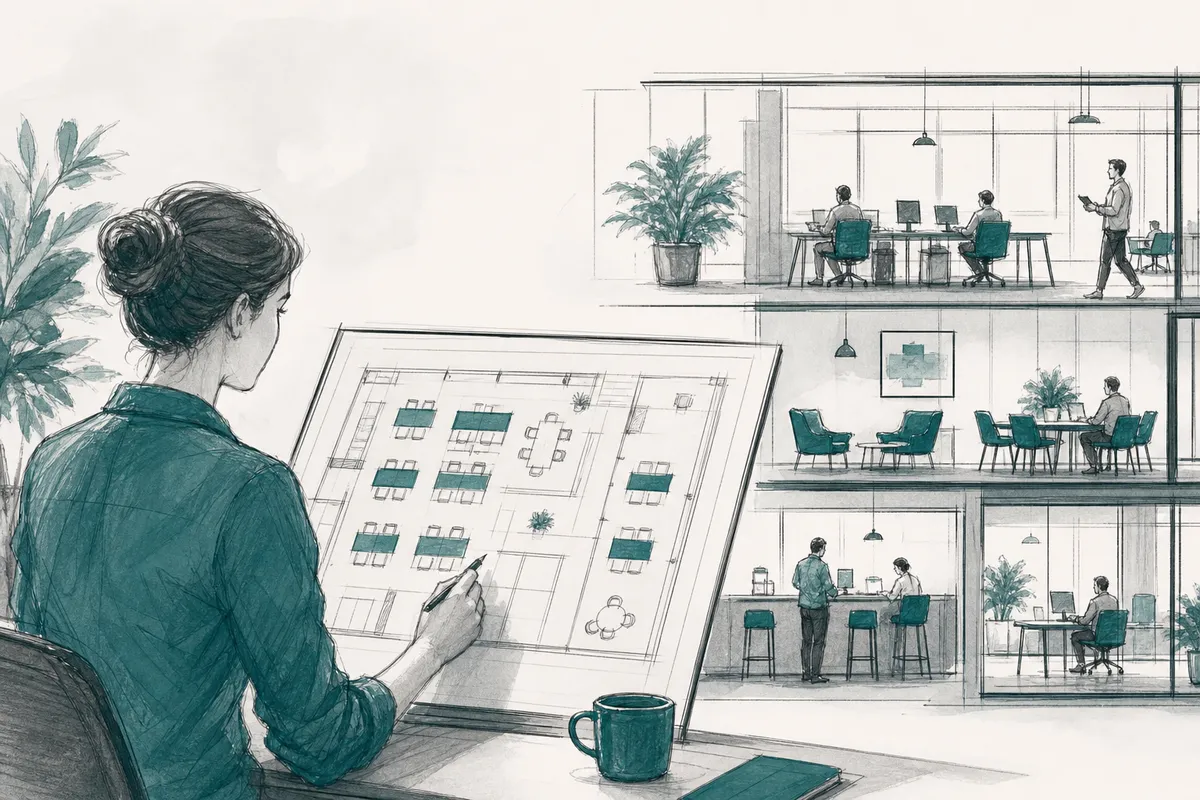
Workforce capacity planning, in a hybrid work context, means matching the amount and type of office space you keep to how many people actually show up and what they need when they're there. Instead of paying for desks sized to headcount, you size real estate to real attendance patterns, by day, team, and function. Done well, it cuts wasted square footage, lowers real estate costs, and still gives employees a desk, room, or collaboration space when they need one.
In hybrid real estate, workforce capacity planning is the ongoing practice of sizing office space to actual weekly presence instead of a fixed headcount total. It replaces a static floor plan built for every employee showing up at once with a flexible model that adjusts to how people work now.
Traditional space planning assumes a fixed denominator: one desk per employee, sized for near-full occupancy on any given day. That model made sense when everyone worked from the same office five days a week. It breaks down under hybrid schedules, where attendance might swing from 30% on a Friday to 80% on a Tuesday depending on team norms and meeting calendars.
The core inputs for capacity planning shift accordingly. Instead of headcount alone, planners track attendance patterns by day and department, team-level in-office schedules (which days does engineering come in versus sales), the volume of meetings and collaboration sessions that need rooms rather than desks, and predictable spikes tied to seasonal work, product launches, or all-hands events. Get these inputs wrong and you either overbuild, paying for empty desks, or underbuild, leaving employees without a place to sit on peak days.
Distributed teams break the single-headquarters assumption that older space models relied on. When employees work from multiple cities or travel frequently, presence becomes harder to predict from any one office's badge data alone, and demand for space isn't concentrated in a single building.
This is where capacity planning extends beyond the walls of a company's own real estate. Rather than forcing every traveling or remote employee back to one HQ, organizations increasingly need on-demand access to workspace near wherever their people actually are. Upflex addresses this by combining forecasting for owned offices with access to a global network of third-party workspaces, so a distributed team's capacity needs aren't limited to one building's floor plan.
A working strategy needs four components operating together, not in isolation.
The goal isn't maximum utilization of every square foot at any cost. It's a right-sized portfolio, enough space and cost eliminated to matter on the balance sheet, without employees arriving to find no desk or room available.
You cut real estate spend by consolidating underused floors once attendance data proves the slack is consistent, then replacing the fixed lease you no longer need with flexible or on-demand capacity. That's the mechanism behind almost every real estate cost reduction story: it's not a single negotiation, it's a repeated cycle of measuring presence, shrinking footprint, and filling the gap with something more elastic than a ten-year lease.
The failure mode this fixes is familiar to any corporate real estate leader who has looked at badge data and winced. A company signs a lease sized for headcount, say, enough desks for 800 employees, and pays premium rent for that whole footprint even though the badge readers show maybe 300 people on-site on a typical Wednesday and fewer than 150 on Friday. Three days a week, most of the floor sits empty. The lease was planned around who's on payroll, not who actually shows up, and that gap is where the budget leaks.
Three strategies do most of the work: right-sizing, exiting, and blending.
Matching supply to presence starts with pulling data you likely already have: badge swipes, calendar invites, and desk booking logs. Segment that data by team cadence, identify each group's anchor days, the days collaboration and manager expectations reliably pull people in, and you get a presence pattern far more accurate than a headcount spreadsheet.
From there, reallocate by space type, not just square footage. A team with heavy anchor-day overlap needs more meeting rooms and collaboration zones on those days and fewer solo desks; a distributed team with light overlap needs the reverse. This is the core discipline of workforce capacity planning applied to real estate: continuously reconciling what space you're paying for against what space people are actually using, then adjusting both the footprint and the room mix accordingly.
On cost, flexible space options generally fall into three tiers: budget-friendly shared or co-working access for occasional overflow, mid-range dedicated flex space for teams with predictable but partial in-office needs, and premium or enterprise-grade flexible arrangements for organizations that want guaranteed availability across many cities. Upflex's UnifyAI engine forecasts attendance with 97% accuracy and pairs that forecast with an on-demand workspace network, so real estate leaders can right-size the owned portfolio with confidence instead of guessing.
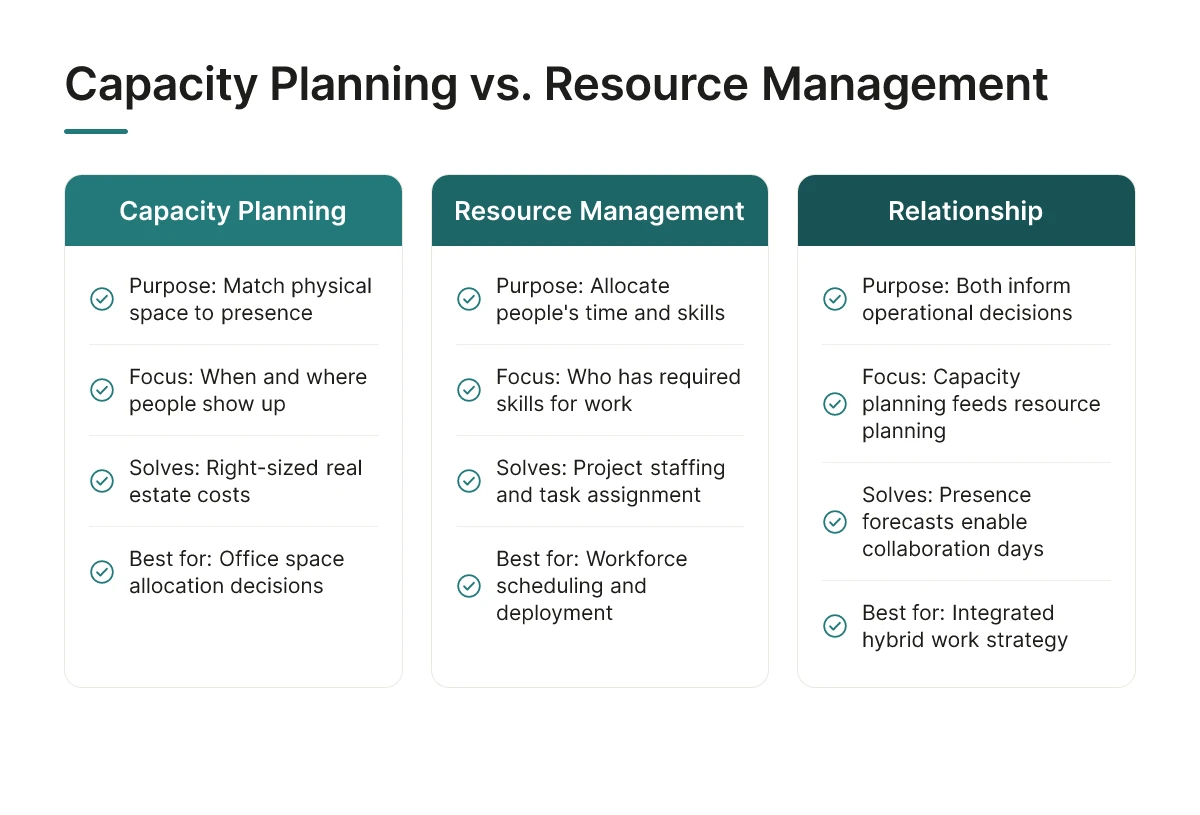
Resource management allocates people's time and skills to projects and tasks; the real estate version of workforce capacity planning allocates physical space to match when and where people actually show up.
Both disciplines answer questions about "enough", but they're asking about entirely different resources. Resource management, the kind HR and project leaders practice, asks whether you have the right skills assigned to the right work at the right time. It's a staffing and scheduling problem. The capacity planning this article covers asks whether your office footprint matches the number of people, teams, and roles who need a desk, a meeting room, or a workstation on a given day. It's a square-footage and utilization problem.
The two aren't unrelated, they feed each other. When a platform forecasts that 60% of the engineering team will come in on Tuesday and Wednesday, that presence data becomes useful input for resource management decisions, like scheduling sprint planning or client workshops on the days most people are physically present. Upflex's UnifyAI engine, for example, forecasts attendance with 97% accuracy specifically so workplace and HR leaders can coordinate in-office days around real presence patterns rather than guesswork. The forecast informs the schedule; it doesn't replace the staffing decision.
Apply a simple test. If the question is "do we have enough of the right space, in the right location, on the days people actually show up," you're doing capacity planning in the real estate sense. If the question is "do we have enough people with the right skills to finish this project," you're doing resource or workforce management in the HR sense.
Search results blur these terms because both get called "workforce capacity planning," and vendors in HR tech and real estate tech both claim the phrase [1][2]. That's a naming collision, not a shared discipline. This article stays on the real estate side deliberately, because the tools, data inputs, and dollar-line outcomes, lease costs, square footage, utilization rates, are entirely different from the skills-and-staffing questions that HR platforms like Workday are built to answer [3].
AI replaces manual guesswork with a rolling forecast, and orchestration software acts on that forecast automatically, closing the loop between prediction and action for workforce capacity planning.
Spreadsheet-based planning relies on static assumptions: a headcount number, an assumed occupancy rate, maybe a quarterly survey. That approach can't account for the fact that attendance shifts week to week based on meetings, manager expectations, and team norms.
AI models close that gap by pulling historical badge swipes, desk booking records, and calendar data, meeting invites, recurring team days, travel schedules, into a single forecasting engine. Upflex's UnifyAI engine, for example, processes these inputs to predict attendance with 97% accuracy, forecasting not just how many people are coming in but who, on which days, and to which floor or neighborhood. That level of granularity is what turns capacity planning from a quarterly estimate into a continuously updated operating input.
Forecasting is only half the job. Orchestration platforms take the predicted attendance pattern and act on it: opening or closing floors based on projected demand, rebalancing desk pools between teams, and triggering on-demand workspace bookings when a location is set to exceed capacity. Upflex pairs this orchestration with access to a global on-demand workspace network, so overflow demand, a sales team visiting headquarters, a project group needing extra capacity for a week, gets routed to flexible space instead of forcing a lease decision.
Expect data quality gaps, uneven employee adoption of booking tools, and cross-team change management, not a single clean switch-over.
Connect the platform to your HRIS, real estate/facilities systems, and calendar tools so forecasts reflect actual org structure and space inventory.
HRIS integration supplies org charts, team assignments, and reporting lines, so forecasts can be broken down by department rather than treated as one undifferentiated headcount. Real estate and facilities systems contribute floor plans, lease terms, and current space inventory, which is what allows a platform to recommend consolidation or floor closures with confidence. Calendar integration adds meeting-driven signals, recurring all-hands, client visits, team offsites, that shift presence patterns week to week.
Platform investment for this kind of workforce capacity planning software typically sits in a mid-range to enterprise tier depending on portfolio size and integration complexity, so it's worth scoping the rollout against expected real estate savings before committing to a full deployment.
Five metrics prove whether workforce capacity planning is working: space utilization rate, peak-day occupancy, seat-to-employee ratio, cost per occupied seat, and square footage per person over time.
Space utilization rate compares actual use against total available capacity, not bookings against capacity. Peak-day occupancy shows how much space you need on your busiest day, which matters more than average occupancy when you're deciding whether to cut square footage. Seat-to-employee ratio tells you how many desks exist per headcount, and cost per occupied seat translates that into a dollar figure finance can act on. Track square footage per person quarter over quarter to see whether your footprint is actually shrinking relative to headcount, not just on paper.
Realistic ROI shows up as reduced square footage under lease, consolidated office locations, and avoided expansion costs, not as a single universal percentage.
Frame ROI around three mechanisms. First, reduced footprint: renewing a lease at a smaller square footage once utilization data proves you don't need the current space. Second, consolidation: closing an underused satellite office and shifting that team into a shared or on-demand workspace instead. Third, avoided cost: skipping a planned expansion because forecasting shows current space can absorb growth with better scheduling. Upflex customers use exactly this pattern, utilization data feeding portfolio decisions, with documented outcomes north of 40% reduction in real estate spend for organizations that consolidate aggressively. The size of the win depends on your starting utilization rate and how much of your portfolio is under long-term lease versus flexible terms.
Measure utilization by combining badge-in data, booking system records, and occupancy sensors, never rely on bookings alone.
Booking data alone overstates use, because employees reserve desks and don't show up. Badge-in data confirms someone entered the building. Sensor or occupancy data confirms a desk was actually occupied, not just a room. Layering these three sources gives you actual-use numbers instead of booked-but-unused numbers, which is the gap that misleads most real estate decisions. Upflex's UnifyAI engine forecasts attendance with 97% accuracy by processing this kind of scheduling and utilization data, which turns raw occupancy records into a coordination plan rather than a retrospective report.
Review cadence matters as much as the metrics themselves. Check utilization monthly, revisit space reallocation quarterly, and reassess portfolio strategy, leases, consolidation, footprint, annually. Avoid optimizing purely for occupancy percentage: a office running at 95% utilization with employees unable to find a desk will show up in satisfaction scores and space-availability complaints before it shows up in your metrics. Pair every utilization number with an employee experience signal.
Workforce capacity planning still matters for fully remote teams, but the focus shifts from desk supply to occasional-use space. Even remote-first companies need data on how many employees attend offsite meetings, team gatherings, or regional hubs, so they can size shared workspace agreements instead of maintaining permanent square footage nobody uses daily.
Review your office capacity plan quarterly, with a lighter check-in monthly during periods of headcount change or policy shifts. Lease events, reorgs, and seasonal attendance swings all justify an off-cycle review, waiting a full year risks locking in decisions based on stale utilization data.
Yes, but manual capacity planning relies on badge swipes and spreadsheets that show what already happened, not what's coming. Teams without AI forecasting typically react to overcrowding or empty floors after the fact, rather than adjusting desk allocation or workspace access ahead of time.
Most capacity planning efforts fail because they rely on scheduling intentions instead of actual attendance behavior. Employees say they'll be in Tuesday through Thursday, but real patterns shift week to week, and plans built on stated preference rather than predictive data quickly drift out of sync with real occupancy, leading to wasted space or desk shortages.
Workforce capacity planning works when it's built on prediction, not guesswork. Start by replacing scheduling assumptions with attendance forecasting, then use that data to decide which offices to keep, shrink, or exit, and where flexible workspace access can cover the gaps. Upflex customers combine UnifyAI's 97%-accurate forecasting with on-demand workspace access to hit 88% co-attendance while cutting real estate spend by 40%+.
Your next step: pull three months of badge or booking data and compare it against stated hybrid schedules. The gap between the two numbers is where your real estate savings are hiding.
Explore more from our content library: