Share This Article
No items found.


Enterprise workspace solutions help multi-country hybrid teams match office supply to actual attendance, so real estate costs drop without cutting the space people need. They combine on-demand desk and office access, attendance forecasting, and cross-location booking into one system, replacing fixed per-city leases with flexible capacity that scales up or down by office. Companies typically pair a flexible workspace network with internal utilization data to decide where to shrink owned space and where to add on-demand access instead. As organizations evaluate enterprise workspace solutions, the goal is usually the same: match real occupancy, not assumed occupancy, to the space being paid for.
On-demand workspace networks give employees access to third-party offices and co-working locations billed by actual usage instead of fixed, multi-year lease terms. This is the foundation most enterprise workspace solutions build on, because it separates "having space available" from "owning space outright." For a broader breakdown of how these networks fit into the wider category, this flex workspace glossary on enterprise solutions is a useful reference point.
The mechanism is straightforward: a company pays for access to a network of partner locations, and employees book a desk or office only when they need one. There's no lease signature, no buildout, and no sunk cost if headcount in a given city shifts next quarter.
This model is built for distributed teams with small or fluctuating headcount spread across multiple countries, the kind of footprint that makes a traditional lease a bad bet. A five-person satellite team in Lisbon or Singapore doesn't need its own office; it needs reliable access to one.
What most comparisons miss is network density. Availability alone doesn't tell you much, what matters is how many partner locations exist per city, because that determines whether an employee gets a walkable option near home or ends up commuting across town anyway. Upflex's on-demand network spans a large number of partner locations globally, which is the differentiator that makes density, not just raw availability, the metric worth evaluating.
Attendance forecasting tools predict which employees will show up at which office on which day, so space planners can size capacity before signing or renewing a lease. This is one of the enterprise workspace solutions categories where accuracy compounds: a small error at the office level can distort an entire portfolio plan.
These models pull from booking patterns, calendar data, and historical attendance trends to generate a per-location occupancy prediction, rather than a single company-wide estimate. Upflex's UnifyAI engine, for example, forecasts attendance at 97% accuracy, which lets real estate teams plan desk counts for a specific floor or building instead of guessing from a blended average.
The benefit is avoiding both failure modes at once: overcrowded offices that damage the in-office experience, and half-empty floors the company is still paying full rent on.
This category serves large organizations running multiple offices where attendance varies by team, day of week, and season, a sales team's Tuesday pattern looks nothing like an engineering team's Thursday pattern.
Forecasting accuracy matters far more at the individual office level than at the company level. A company-wide average of 60% utilization can hide one building running at 95% and another at 25%, and only location-specific forecasting surfaces that gap before it shows up as wasted rent.
Utilization sensors and analytics platforms measure what actually happens on the floor, not what was booked or predicted, using occupancy sensors, badge swipes, or Wi-Fi connection data.
This ground-truth layer is distinct from booking data because it captures real behavior: whether a desk reserved at 9 a.m. was ever sat in, or whether a conference room booked for eight people held two. The benefit is exposing the gap between booked and used space, a blind spot that forecasting tools alone can't catch since forecasts predict intent, not outcomes.
This is best suited to organizations that already hold office space and need to decide what to cut, consolidate, or renegotiate, not companies still planning a first footprint.
Booking data alone tends to overstate real utilization. No-shows go unrecorded as empty, and block-booking, where a team reserves a room or floor "just in case", inflates the numbers further. Sensor data corrects for both, giving finance and real estate leaders a number they can defend to a CFO during lease renewal conversations. Among enterprise workspace solutions, this is the layer that turns assumptions into evidence.
Centralized booking platforms let employees reserve a desk, room, or office across every country the company operates in from a single interface.
The mechanism replaces a patchwork of per-city or per-building booking tools with one layer that spans owned offices, flex space, and meeting rooms alike. An employee in Toronto and one in Warsaw use the same system, the same rules, and the same visibility into what's available. Upflex's desk booking and space management functions work this way, uniting booking, forecasting, and network access into a single dashboard rather than separate point tools. For context on how these unified platforms are typically defined and positioned, see this overview of enterprise workplace solutions.
The benefit is a consistent employee experience regardless of which office or country someone is booking in, no relearning a new tool every time someone travels between offices.
Beyond convenience, a single booking layer cuts procurement overhead directly. Companies consolidating fragmented booking tools into one enterprise workspace solution typically see:
This fits companies running a mix of owned offices and flex space across several regions, where fragmentation is the default without active consolidation.

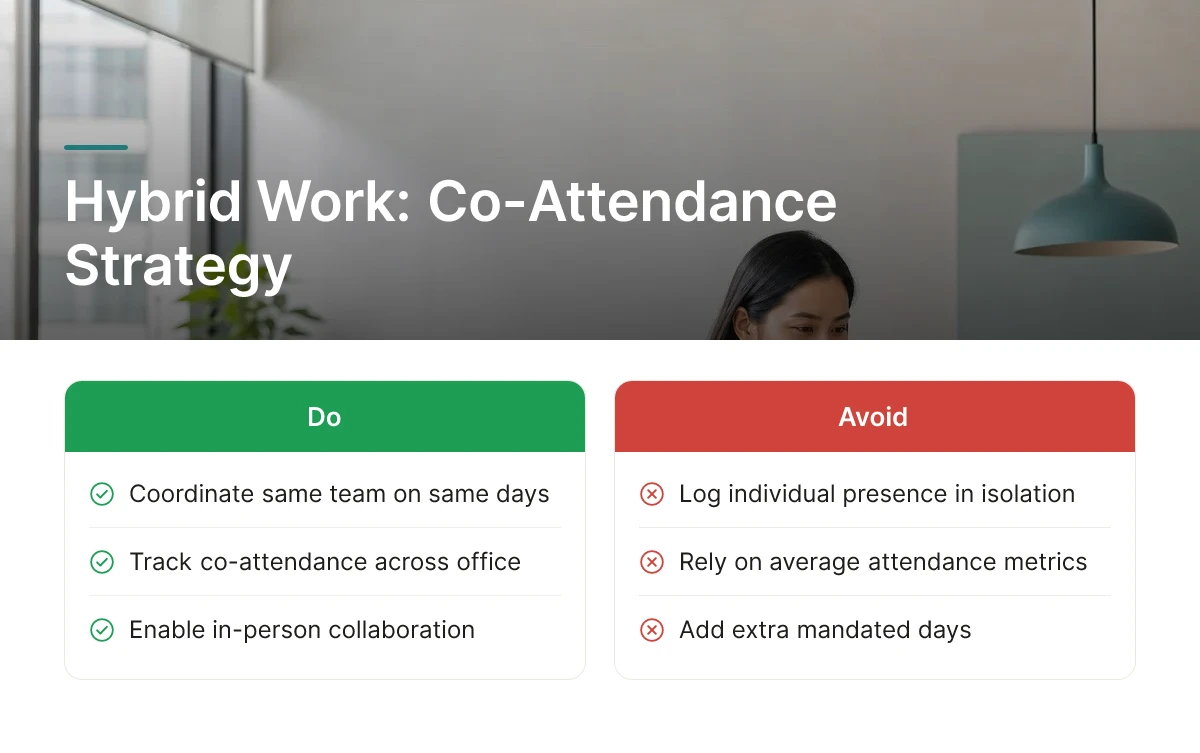
Hybrid scheduling software coordinates which days a whole team comes in together, rather than just logging whether each person showed up.
The mechanism targets co-attendance, the same team, in the same office, on the same days, instead of tracking individual presence in isolation. That distinction matters: a building can report strong average attendance while colleagues on the same team never actually overlap, which defeats the purpose of showing up at all.
The benefit is more in-person collaboration without adding a single extra mandated day. Upflex tracks this directly, with a benchmark outcome of 88% co-attendance achievement among teams using its coordination tools.
This fits teams with low in-person collision rates despite having office access, people are badging in, just not on the days that matter for collaboration.
Most comparisons treat attendance tracking and co-attendance coordination as the same thing. They aren't: tracking tells you who was in the building, while coordination tells you whether the right people were in the building together, which is the metric that actually predicts collaboration outcomes. For teams exploring how collaborative tools support this coordination directly, this list of AI collaborative workspace tools for remote teams covers several relevant options.
These systems connect daily desk and room usage data to lease terms and portfolio reporting, so occupancy numbers directly inform renewal, downsizing, or consolidation decisions.
Without this link, utilization data lives in a facilities dashboard that finance never sees, and real estate decisions get made on anecdote rather than evidence. An integrated platform instead treats usage data as a continuous input to portfolio strategy, tracking which floors, buildings, or regions run under capacity month over month and flagging them before a lease decision point arrives.
The key benefit is converting day-to-day occupancy tracking into a real estate strategy, rather than leaving it siloed inside a facilities team that has no mandate to renegotiate leases. This matters most for corporate real estate leaders managing a multi-country lease portfolio, where dozens of renewal dates, currencies, and local market conditions are in motion at once.
The differentiator is timing. Underused space identified six months before a lease renewal gives a company use to downsize, sublease, or exit; the same data surfacing after renewal just confirms a sunk cost for another lease term. Platforms that surface utilization trends against upcoming renewal dates, rather than reporting usage in isolation, are the ones that actually change portfolio outcomes.
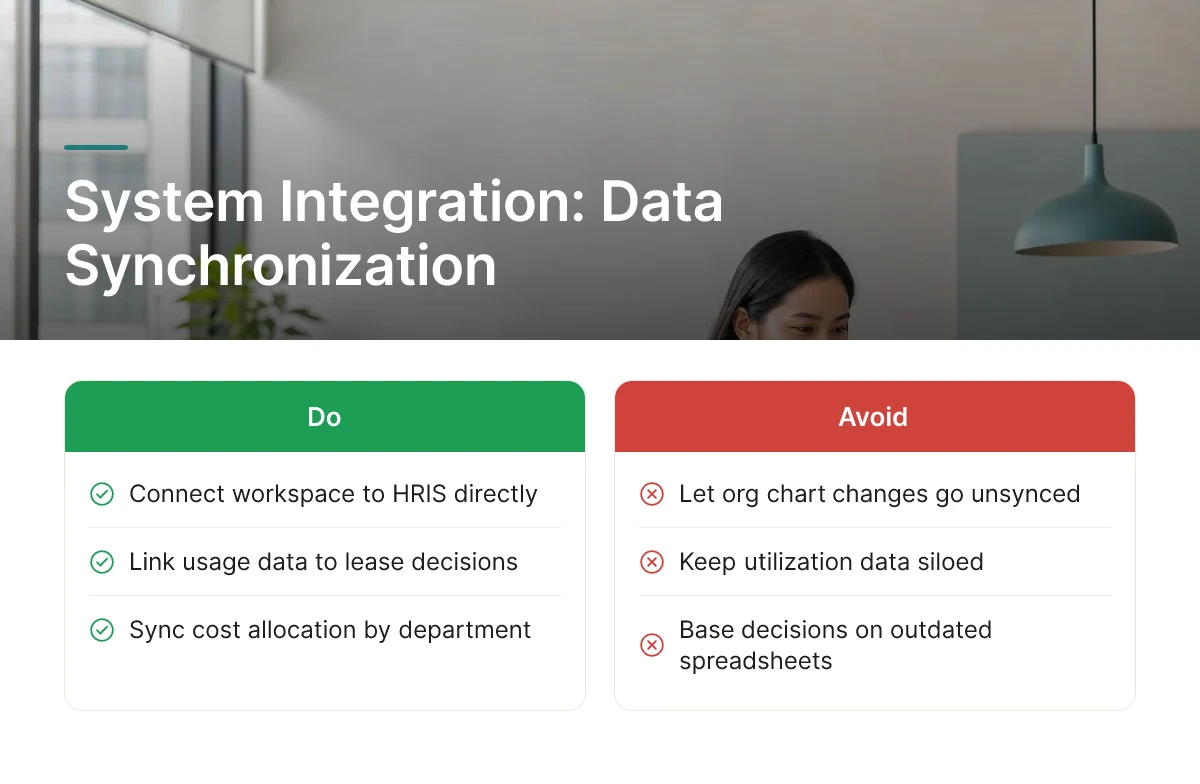
Integration layers connect a workspace platform to existing HR, finance, and facilities systems so headcount, cost, and space data stay synchronized automatically.
HRIS integration matters because space planning goes stale the moment org charts change. When a workspace solution pulls headcount and team structure directly from the HRIS, desk allocations and attendance forecasts reflect who actually works where today, not who worked there when the last spreadsheet was updated. ERP and finance system integration matters for a different reason: cost allocation by department, business unit, or region only holds up if it is based on accurate, current usage data rather than estimated square footage splits.
At minimum, a workspace platform should connect to the following systems:
The benefit of connecting all three is avoiding manual spreadsheet reconciliation across systems and countries, a recurring task for teams managing multi-country enterprise workspace solutions with different local HR and finance tools.
This matters most for enterprises with established tech stacks that cannot tolerate another siloed point tool. The differentiator to evaluate is integration depth: API-based real-time sync keeps space data current to the day, while periodic batch exports can leave planning decisions based on data that is weeks old. A closer look at how global organizations structure this kind of connectivity is available in this global enterprise digital workplace strategy analysis.
These tools track country-specific labor law, tax treatment, and data residency rules so flexible workspace policy doesn't create legal exposure when scaled across borders.
Workspace rules are not uniform across markets. Labor law governing remote work eligibility, local tax treatment of office space and flexible work allowances, and data residency requirements for workplace applications all vary by country [3]. A desk-booking or attendance policy that is compliant in one jurisdiction can create liability in another if it is rolled out without local review.
Solutions built for cross-border operation typically layer local regulatory rules, labor, tax, and data residency, on top of a shared global platform, so headquarters sets policy while regional teams retain the controls needed to stay compliant locally [3]. The benefit is reduced legal and compliance risk when scaling flexible workspace policy into new countries, rather than discovering gaps after a regulator or local counsel flags them.
This is best suited to multinational companies entering new markets or regions without in-house local real estate expertise. The differentiator here is treating compliance and regional management as one connected mechanism rather than two separate topics, most vendor content defines sector-specific terms for finance, legal, or tech teams without explaining how compliance actually gets enforced across a live, multi-country workspace deployment.
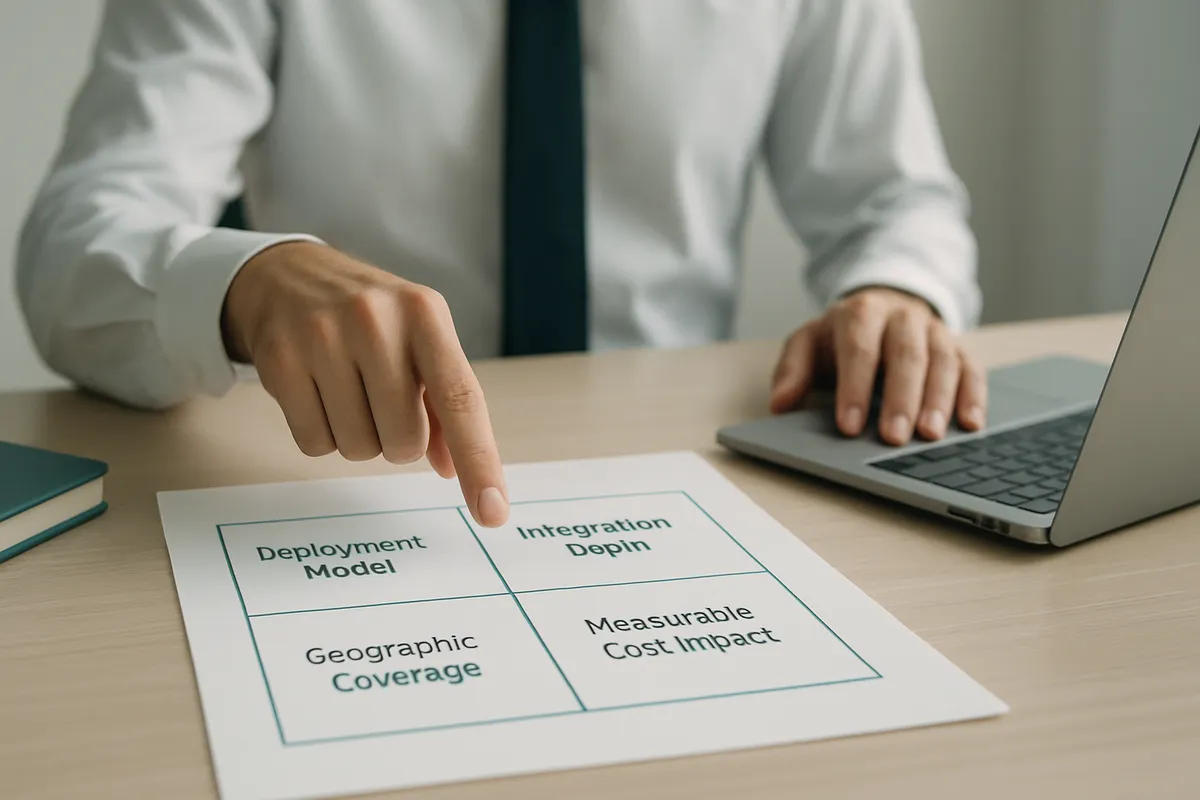
Compare vendors on four criteria: geographic network coverage, integration depth, forecasting accuracy, and realistic deployment timeline.
Start with geographic coverage, does the network of available workspaces actually match where your teams travel and work, not just where your headquarters sits. Then check integration depth with existing HRIS, ERP, and facility systems, since shallow integrations mean ongoing manual reconciliation. Evaluate how attendance forecasting works: a platform that predicts office attendance with high accuracy, such as Upflex's UnifyAI engine at 97% accuracy, gives real estate and HR leaders a defensible basis for space decisions instead of a guess. Finally, ask for a realistic deployment timeline before committing.
Run a basic cost-benefit comparison before choosing: total current real estate spend plus the administrative overhead of managing bookings, leases, and compliance manually, weighed against the cost tier of a flexible-model platform that combines owned-office management with on-demand workspace access. Upflex, for example, reports outcomes of 40%+ reduction in real estate spend alongside 88% co-attendance achievement for customers consolidating owned space with on-demand access.
Before committing to any vendor, ask the following:
A single-office pilot can move in weeks. A multi-country rollout takes longer because it requires coordination across legal, HR, and local facilities teams for compliance and change management. The most common pitfalls are rolling out everywhere at once instead of piloting one region first, and underestimating how much change management employees used to assigned desks actually need.
Track utilization rate, cost per occupied seat, co-attendance achievement, and real estate spend per employee. Utilization rate exposes the gap between leased capacity and actual use, often the single biggest number finance leaders cite when justifying cuts. Co-attendance achievement matters to HR, since it proves teams are still meeting in person at target rates rather than just saving money. Upflex reports these figures natively, including a benchmark of 88% co-attendance achievement among customers using its forecasting tools.
Overcome resistance by giving employees forecasting and booking tools before enforcing any attendance mandate, not after. Workers resist rigid return-to-office policies more than they resist technology; the friction usually comes from unpredictable commutes and inability to find a desk. Platforms like Upflex address this by predicting attendance with 97% accuracy and pairing it with on-demand workspace access, so employees get flexibility rather than a mandate.
The most common mistake is signing long-term leases or canceling space before utilization data confirms actual need. A close second is deploying desk booking without attendance forecasting, which leaves coordination to chance. Avoid tools that manage only owned offices or only flex space, real estate decisions need visibility across both to be defensible to a CFO. Organizations rolling out enterprise workspace solutions across several countries at once, rather than piloting a single region first, also tend to underestimate the change management burden.
AI-driven attendance forecasting and unified management of owned-plus-flex portfolios are the two clearest trends shaping 2026 planning. Hybrid work has stabilized rather than reversed, with Gallup finding 52% of remote-capable U.S. employees working hybrid and 26% fully remote [4]. That split keeps pressure on real estate leaders to manage variable attendance instead of fixed headcount.
Organizations using AI-powered forecasting and on-demand workspace access have documented real estate spend reductions of 40%+. Savings this size typically come from consolidating underused offices once utilization data confirms which locations and floors are safe to cut. Upflex customers reach this outcome by combining attendance prediction with flexible access rather than guessing at footprint reduction.
Real estate leaders don't need another desk booking app, they need utilization data accurate enough to justify a lease decision to the CFO and flexible enough to keep employees from the HR team happy. The three takeaways: forecast attendance before cutting space, track co-attendance alongside cost metrics, and give employees on-demand access rather than a mandate. Upflex pairs 97% accurate attendance forecasting with a global on-demand workspace network, letting you consolidate owned offices while still covering distributed teams. Start by auditing utilization across your current portfolio for 30 days before your next lease renewal decision, and use that window to compare enterprise workspace solutions against your actual occupancy data rather than vendor claims alone.
Explore more from our content library: