Office Space Planning Guide: Expert Steps for 2026
Upflex team
April 7, 2026
Key Insight
Explanation
Space Efficiency
Proper planning can reduce real estate costs by 40% while improving productivity
Hybrid Considerations
2026 office designs prioritize flexible spaces that adapt to changing attendance patterns
Technology Integration
AI-powered space management systems now deliver 97% accuracy in attendance forecasting
Employee Well-being
Strategic space planning improves employee satisfaction by 35% and reduces turnover
Future-Proofing
Scalable designs accommodate 25% growth without major renovations
ROI Measurement
Data-driven planning enables precise space utilization tracking and cost optimization
Creating an effective office space planning guide requires strategic thinking, data-driven decisions, and a deep understanding of how modern teams work. This comprehensive office space planning guide will walk you through every step needed to optimize your workspace for maximum productivity, cost efficiency, and employee satisfaction.
Whether you're designing a new office from scratch, renovating an existing space, or adapting to hybrid work models, this guide provides the framework to make informed decisions. You'll learn to balance space efficiency with employee needs, integrate cutting-edge technology, and create environments that support both collaboration and focused work.
The process typically takes 4-8 weeks for small to medium offices, with larger corporate spaces requiring 3-6 months. The difficulty level is moderate, requiring attention to detail and stakeholder coordination, but following these structured steps will ensure success.
What You'll Need: office space planning guide
Before starting your office space planning guide implementation, gather the essential tools and information that will ensure a successful project. Having the right resources upfront prevents costly delays and design mistakes later in the process.
### Essential Tools and Software
Floor planning software: AutoCAD, SketchUp, or online tools like Lucidchart for creating detailed layouts
Measuring equipment: Laser measuring devices, tape measures, and digital calipers for precise dimensions
Space management platforms: Tools like Upflex's workplace optimization system for data-driven insights
Project management software: Asana, Monday.com, or similar platforms for coordinating timelines and stakeholders
Budget tracking tools: Spreadsheet templates or dedicated financial planning software
### Required Information and Data
You'll need comprehensive data about your current situation and future goals. Start by collecting employee headcount projections for the next 2-3 years, including department-specific growth plans. Gather existing space utilization data if available, or plan to conduct a 2-week observation period to establish baseline metrics.
Pro Tip: Document your current space usage patterns before making any changes. Many organizations discover they're using only 60-70% of their available space efficiently, revealing immediate optimization opportunities.
### Stakeholder Involvement
Successful office space planning requires input from multiple departments. Include HR representatives who understand employee needs and work styles, IT teams for technology infrastructure requirements, and facilities management for operational considerations. Finance stakeholders provide budget constraints and ROI expectations, while department heads offer insights into team-specific workflow requirements [1].
According to the University of California San Diego's administrative space planning guidelines, involving stakeholders early in the process reduces redesign iterations by up to 50% and improves final satisfaction scores [1].
Step 1: Assess Your Current Space and Requirements
Conduct a comprehensive space audit to establish your baseline and identify optimization opportunities. This assessment forms the foundation of your entire office space planning guide strategy and directly impacts all subsequent decisions.
### Measuring and Documenting Current Space
Create detailed floor plans: Measure every room, corridor, and common area to the nearest inch
Catalog existing furniture and equipment: Document dimensions, condition, and current usage patterns
Assess natural light sources: Map windows, skylights, and artificial lighting throughout the space
Document traffic flow patterns: Observe how employees move through the space during different times of day
### Analyzing Space Utilization Data
Modern office space planning relies heavily on data analytics to make informed decisions. Install occupancy sensors or use badge-swipe data to track actual space usage over a 4-6 week period. Many organizations discover significant discrepancies between allocated space and actual usage patterns.
Conference rooms often show 40-60% utilization rates despite appearing "always booked"
Individual offices may be occupied less than 50% of standard work hours
Collaboration spaces frequently experience peak demand during specific hours, creating bottlenecks
Storage areas often contain outdated equipment and supplies, wasting valuable square footage
### Defining Future Requirements
Your space assessment must account for both current needs and future growth projections. The University of Michigan's space planning guidelines recommend planning for 15-25% growth capacity to avoid premature renovations [2]. Consider changes in work patterns, technology adoption, and business model evolution when projecting space needs.
Pro Tip: Use the 80/20 rule for space allocation. Plan for 80% of your space to handle normal operations, with 20% reserved for peak periods, special projects, and growth accommodation.
Document specific requirements for each department, including specialized equipment needs, privacy requirements, and collaboration frequency. This granular analysis ensures your final design supports actual work patterns rather than assumptions about how space should be used.
Step 2: Analyze Workflow Patterns and Space Utilization
Understanding how work actually happens in your organization is crucial for creating an effective office space planning guide. This analysis reveals the gap between intended space usage and reality, enabling data-driven design decisions.
### Conducting Workflow Analysis
Map daily work patterns: Track employee movements, meeting frequencies, and collaboration touchpoints
Identify peak usage periods: Document when different spaces experience highest demand
Analyze cross-departmental interactions: Determine which teams collaborate most frequently
Document technology usage patterns: Assess how employees interact with shared resources and equipment
Survey employee preferences: Gather input on workspace satisfaction and desired improvements
### Space Utilization Metrics and Benchmarks
Industry research from 2026 shows that well-planned offices achieve 75-85% space utilization rates, compared to 45-60% in poorly planned environments [3]. Key metrics to track include desk occupancy rates, meeting room utilization, and dwell time in different zones.
Space Type
Optimal Utilization
Common Problems
Individual Workstations
60-75%
Hoteling conflicts, size mismatches
Meeting Rooms
70-85%
Ghost bookings, wrong room sizes
Collaboration Zones
40-60%
Noise issues, lack of privacy
Quiet Focus Areas
50-70%
Insufficient quantity, poor acoustics
### Identifying Optimization Opportunities
Through workflow analysis, most organizations discover several optimization opportunities that weren't apparent during initial assessments. Common findings include underutilized conference rooms that are too large for typical meetings, collaboration spaces located in high-traffic areas that create noise conflicts, and individual workstations that don't match actual team sizes.
Right-size meeting rooms based on actual usage data rather than maximum capacity needs
Relocate noisy collaborative activities away from quiet work zones
Create flexible spaces that can adapt to different functions throughout the day
Eliminate redundant storage areas and convert them to productive workspace
At Upflex, we've found that organizations using AI-powered space analytics can identify optimization opportunities that improve space efficiency by 25-40% without requiring additional square footage. This data-driven approach to office space planning ensures decisions are based on actual usage patterns rather than assumptions [4].
Pro Tip: Conduct your workflow analysis during both normal and peak periods. Many space planning mistakes occur because designs only account for average usage rather than accommodating periodic spikes in activity.
Step 3: Design Your Optimal Layout
Creating an optimal office layout requires balancing multiple competing priorities while maintaining flexibility for future changes. This phase of your office space planning guide translates analysis into actionable design decisions that support productivity and employee satisfaction.
### Zone-Based Design Principles
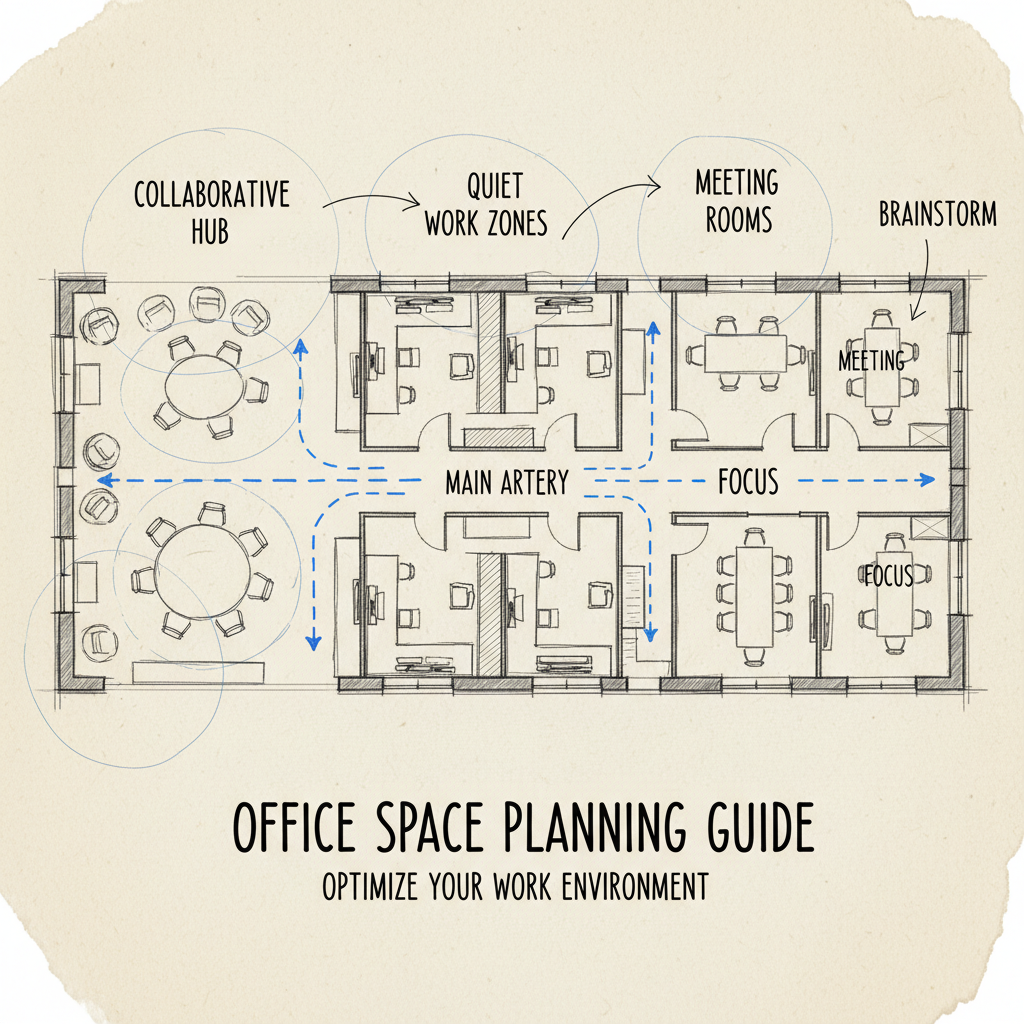
Establish primary zones: Create distinct areas for focused work, collaboration, meetings, and social interaction
Design transition spaces: Plan buffer zones between noisy and quiet areas to minimize disruption
Optimize traffic flow: Position high-traffic areas near entrances and away from concentration zones
Plan for flexibility: Design modular spaces that can be reconfigured as needs change
Integrate support functions: Position printing, storage, and kitchen areas for convenient access without disrupting workflow
### Space Allocation Guidelines
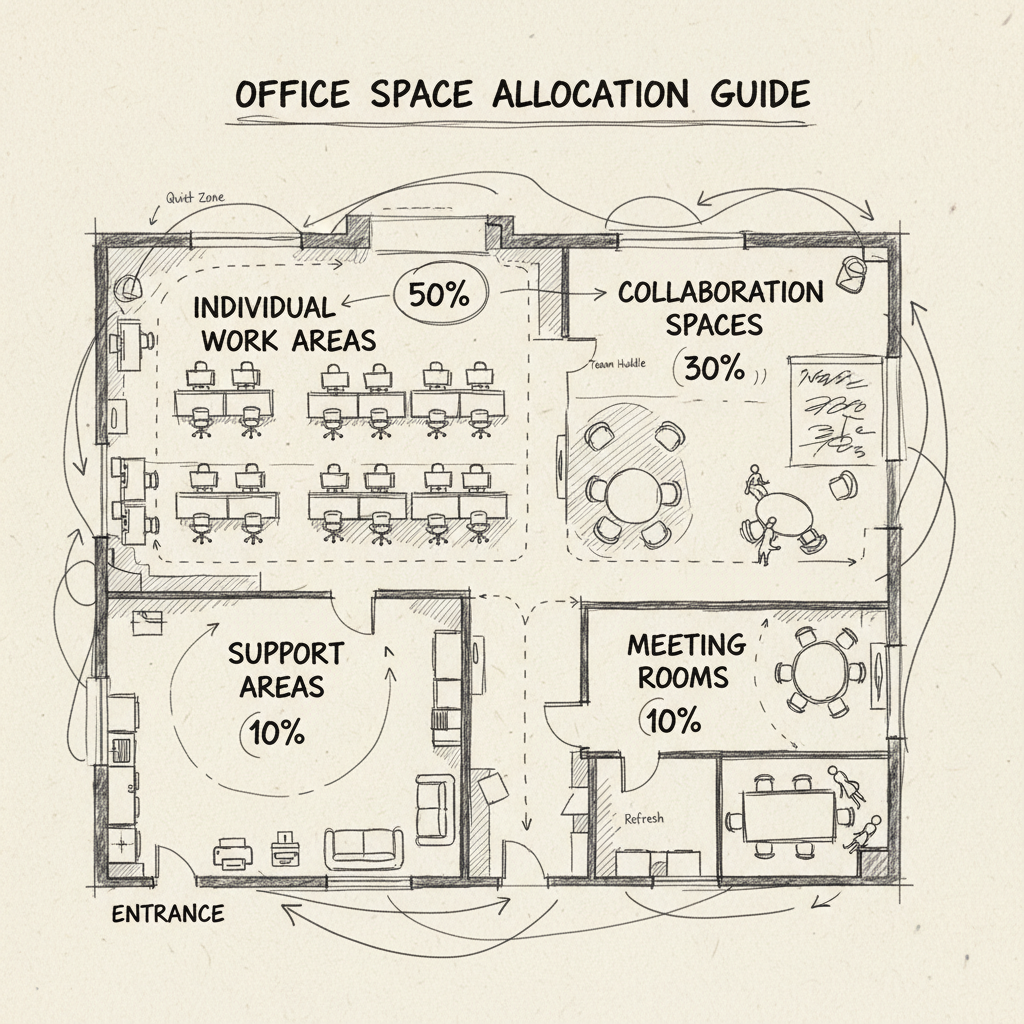
Industry standards from the Whole Building Design Guide recommend specific space allocations based on organizational function and culture [5]. However, 2026 trends favor more flexible, activity-based working environments that allocate space based on function rather than hierarchy.
Individual work areas: 50-60% of total space for organizations with high concentration needs
Collaboration zones: 20-25% including both formal meeting rooms and informal gathering spaces
Support areas: 15-20% covering reception, storage, kitchen, and circulation space
Flexible/multi-use areas: 10-15% that can adapt to changing needs throughout the day
### Technology Integration Planning
Modern office space planning must account for extensive technology infrastructure from the design phase. Plan for power and data access at every workstation, with additional capacity for mobile device charging and temporary equipment setup.
Consider the placement of video conferencing equipment, digital displays, and collaborative technology tools. The University of California Berkeley's space planning guidelines emphasize that technology infrastructure decisions made during the design phase are significantly less expensive than retrofitting later [6].
### Accessibility and Compliance Considerations
Your office space planning guide must ensure compliance with Americans with Disabilities Act (ADA) requirements and local building codes. This includes wheelchair-accessible pathways, appropriate door widths, accessible restroom facilities, and proper signage placement.
Pro Tip: Design for universal accessibility from the start rather than making accommodations later. This approach creates better spaces for everyone and avoids costly retrofitting when accessibility needs arise.
Plan for adequate lighting levels throughout the space, with particular attention to task lighting for detailed work and ambient lighting for collaboration areas. Natural light access should be distributed equitably across the organization rather than concentrated in executive areas.
Step 4: Implement Technology and Infrastructure
Technology infrastructure implementation is a critical component of any comprehensive office space planning guide. Modern workplaces require sophisticated systems that support both current operations and future scalability, with particular emphasis on hybrid work capabilities as of 2026.
### Essential Technology Systems
Install robust networking infrastructure: Deploy enterprise-grade WiFi with sufficient bandwidth for video conferencing and cloud applications
Implement space management software: Install occupancy sensors and booking systems to optimize space utilization
Set up integrated communication systems: Ensure seamless connectivity between in-office and remote team members
Deploy security and access control: Install badge readers, cameras, and visitor management systems
Configure environmental controls: Implement smart HVAC and lighting systems for comfort and energy efficiency
### Space Management Technology
Advanced space management platforms have become essential for optimizing office space utilization in 2026. These systems provide real-time data on space usage, enable dynamic room booking, and support hybrid work coordination.
Occupancy sensors track actual space usage versus allocated space
Desk booking systems enable hot-desking and flexible seating arrangements
Meeting room management prevents ghost bookings and optimizes room utilization
Environmental monitoring ensures optimal comfort and air quality
Integration APIs connect space data with HR and facilities management systems
Research from Matterport indicates that organizations using integrated space management technology achieve 30-40% better space utilization rates compared to those relying on manual processes [7]. These systems also provide valuable data for future space planning decisions and lease negotiations.
### Infrastructure Planning and Installation
Power and data infrastructure must support current needs while providing capacity for future growth. Plan for at least 20% more power outlets and network drops than current requirements suggest, as technology adoption typically exceeds initial projections.
Infrastructure Type
Minimum Requirements
Future-Ready Specs
Network Speed
1 Gbps per 50 users
10 Gbps backbone, 1 Gbps per 25 users
Power Density
8-10 watts per sq ft
12-15 watts per sq ft
WiFi Coverage
WiFi 6, 1 AP per 2,500 sq ft
WiFi 6E, 1 AP per 1,500 sq ft
AV Infrastructure
4K displays in meeting rooms
8K capability, wireless presentation
Consider the integration challenges between different technology systems during implementation. Ensure that space management platforms can communicate with HVAC systems, security infrastructure integrates with access control, and communication tools work seamlessly across all devices and locations.
Pro Tip: Implement technology in phases to minimize disruption and allow for testing and adjustment. Start with core infrastructure, then add advanced features once the foundation is stable and users are comfortable with basic systems.
Step 5: Execute the Plan and Monitor Performance
Successful execution of your office space planning guide requires careful project management, stakeholder communication, and continuous monitoring to ensure desired outcomes. This final implementation phase determines whether your planning efforts translate into measurable improvements in productivity and cost efficiency.
### Project Management and Timeline Coordination
Develop detailed project timeline: Break down the implementation into phases to minimize business disruption
Coordinate with vendors and contractors: Establish clear communication protocols and quality checkpoints
Manage change communication: Keep employees informed about timeline, expectations, and temporary inconveniences
Plan for contingencies: Build buffer time for unexpected delays or modifications
Establish success metrics: Define measurable outcomes to evaluate project effectiveness
### Phased Implementation Strategy
Most successful office space planning projects use a phased approach that allows for testing and refinement before full deployment. Start with a pilot area or single department to validate design concepts and identify potential issues before organization-wide implementation.
Phase 1: Infrastructure and core systems installation (2-4 weeks)
Phase 2: Furniture and equipment deployment (1-2 weeks)
Phase 3: Technology integration and testing (1 week)
Phase 4: Employee orientation and training (ongoing)
Phase 5: Performance monitoring and optimization (ongoing)
According to Envoy's office space planning research, organizations that implement changes in phases experience 60% fewer disruptions and achieve target utilization rates 40% faster than those attempting complete overhauls [8].
### Performance Monitoring and Optimization
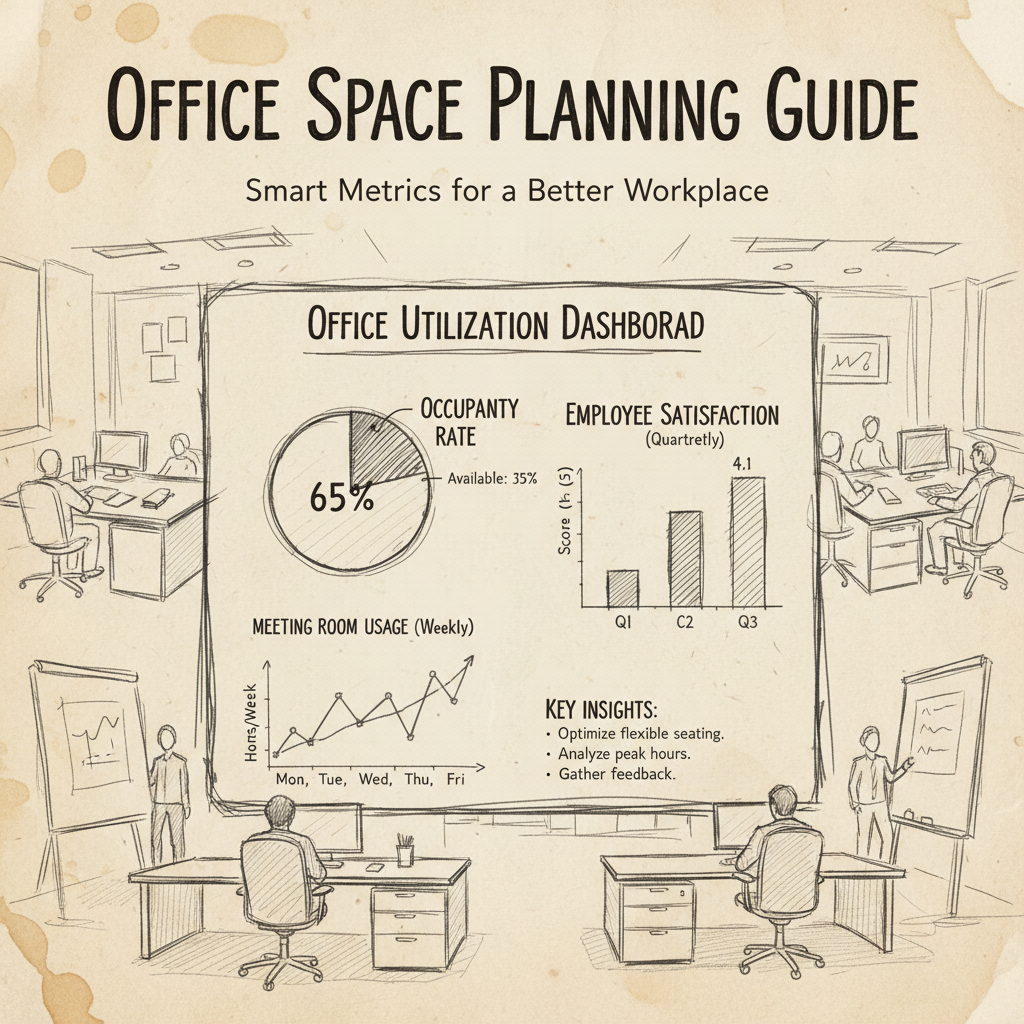
Continuous monitoring ensures your office space planning guide delivers expected results and identifies opportunities for further optimization. Establish baseline metrics before implementation and track progress monthly for the first year.
Key performance indicators include space utilization rates, employee satisfaction scores, collaboration frequency metrics, and cost per square foot. Modern space management platforms provide real-time data on these metrics, enabling quick adjustments when performance deviates from targets.
### Post-Implementation Adjustments
Even well-planned office spaces require adjustments after implementation as employees adapt to new environments and work patterns emerge. Plan for a 3-6 month adjustment period where minor modifications can be made based on user feedback and utilization data.
Pro Tip: Schedule formal review sessions at 30, 90, and 180 days post-implementation. These structured feedback sessions help identify issues early and demonstrate management's commitment to creating an optimal work environment.
Track both quantitative metrics and qualitative feedback to ensure your office space planning guide achieves its intended goals. Regular surveys, focus groups, and observation studies provide insights that pure data analytics might miss, particularly around employee satisfaction and collaboration effectiveness.
Common Mistakes to Avoid
Learning from common office space planning mistakes can save significant time, money, and employee frustration. These pitfalls occur frequently across organizations of all sizes and can undermine even well-intentioned planning efforts.
### Design and Layout Mistakes
The most costly mistakes in office space planning typically occur during the design phase when changes are still relatively inexpensive to implement. Failing to account for actual workflow patterns rather than idealized organizational charts leads to spaces that look impressive but function poorly.
Over-designing collaboration spaces: Creating too many open collaboration areas without sufficient quiet zones for focused work
Ignoring acoustics: Failing to plan for sound management between different activity zones
Poor traffic flow planning: Placing high-traffic areas adjacent to quiet work zones
Inflexible infrastructure: Installing fixed elements that prevent future reconfiguration
Inadequate storage planning: Underestimating storage needs and creating cluttered work environments
One common mistake we see at Upflex is organizations designing for peak capacity rather than typical usage. This results in oversized spaces that feel empty most of the time and underutilized resources that increase cost per employee unnecessarily.
### Technology Integration Failures
Technology mistakes in office space planning are particularly expensive because they often require infrastructure changes after construction is complete. Poor planning around power, data, and connectivity needs can cripple productivity in modern work environments.
Pro Tip: Always plan for 50% more power and data capacity than current requirements suggest. Technology adoption accelerates quickly, and retrofit costs are typically 3-5 times higher than initial installation costs.
Failing to integrate different technology systems creates operational inefficiencies and user frustration. Ensure that space booking systems, access control, environmental controls, and communication tools work together seamlessly rather than operating as isolated systems.
### Stakeholder Engagement Problems
Many office space planning projects fail because they don't adequately involve end users in the design process. Surveying employees about preferences is important, but observing actual work patterns provides more reliable data for design decisions.
Making decisions based on management preferences rather than employee needs
Failing to communicate changes and rationale to affected employees
Implementing changes without adequate training and support
Ignoring departmental differences in work styles and requirements
Not planning for change management during the transition period
Research from Bond Collective shows that office space planning projects with strong stakeholder engagement achieve 85% employee satisfaction rates, compared to 45% for projects with limited user involvement [9].
### Budget and Timeline Overruns
Unrealistic budget and timeline expectations create pressure that leads to compromised decisions and poor outcomes. Factor in contingency time and budget for unexpected issues, change requests, and optimization adjustments after implementation.
Common budget mistakes include underestimating furniture and equipment costs, failing to account for temporary space needs during construction, and not budgeting for employee training and change management support. Timeline mistakes often stem from underestimating permit and approval processes, vendor coordination challenges, and the time required for proper testing and adjustment.
Understanding office space planning guide is essential. Start by conducting a comprehensive space audit and workflow analysis to understand current usage patterns and future needs. Create detailed floor plans, analyze traffic flow, and design zones for different activities while ensuring adequate technology infrastructure and flexibility for future changes.
2. What are the office space trends for 2026?
Office spaces in 2026 prioritize hybrid-ready environments with AI-powered space management, flexible activity-based working zones, and advanced wellness features. The focus has shifted to optimizing space utilization through data analytics rather than simply providing more square footage per employee.
3. What are the best practices in space planning for an office space?
Best practices include conducting thorough needs analysis with stakeholder input, optimizing space utilization through data-driven design decisions, incorporating flexible technology infrastructure, prioritizing employee well-being through proper lighting and acoustics, and planning for future growth with modular, adaptable layouts.
4. How much space should be allocated per employee?
Modern office space allocation ranges from 150-250 square feet per employee, depending on work style and space sharing ratios. Hybrid work models typically require 100-150 square feet per employee due to increased space sharing and flexible seating arrangements.
5. What technology is essential for modern office space planning?
Essential technology includes occupancy sensors for utilization tracking, space booking systems for flexible seating, robust WiFi infrastructure, integrated video conferencing capabilities, and environmental monitoring systems. AI-powered analytics platforms help optimize space allocation and predict future needs.
6. How long does office space planning typically take?
Small to medium office space planning projects typically require 6-12 weeks from initial assessment to implementation, while large corporate spaces may need 3-6 months. The timeline depends on space complexity, stakeholder coordination requirements, and the extent of infrastructure changes needed.
7. What are the biggest mistakes to avoid in office space planning?
Common mistakes include designing for peak capacity rather than typical usage, inadequate acoustic planning between different activity zones, insufficient technology infrastructure, poor stakeholder engagement, and failing to plan for future flexibility and growth.
This comprehensive office space planning guide provides the framework needed to create productive, efficient, and adaptable work environments. By following these structured steps and avoiding common pitfalls, organizations can optimize their real estate investment while supporting employee satisfaction and business objectives.
For organizations seeking advanced space optimization solutions, Upflex's workplace optimization platform combines AI-powered office orchestration with access to global workspace networks. Our technology delivers 97% attendance forecast accuracy and helps organizations achieve up to 40% reduction in real estate costs while improving collaboration and productivity.
About the Author
Written by the SaaS experts at Upflex. Our team brings years of hands-on experience helping businesses with SaaS, delivering practical guidance grounded in real-world results.